
Tadiwanashe Chibonda
Integrating Real-Time Port Data Into Agentic Logistics Planners
(Let's break it down, then build our own system)
By Tadiwanashe H N Chibonda, Zimbabwe 🇿🇼
Let's take that title apart first, because on paper it reads like something only a supply-chain PhD would understand. It's not.
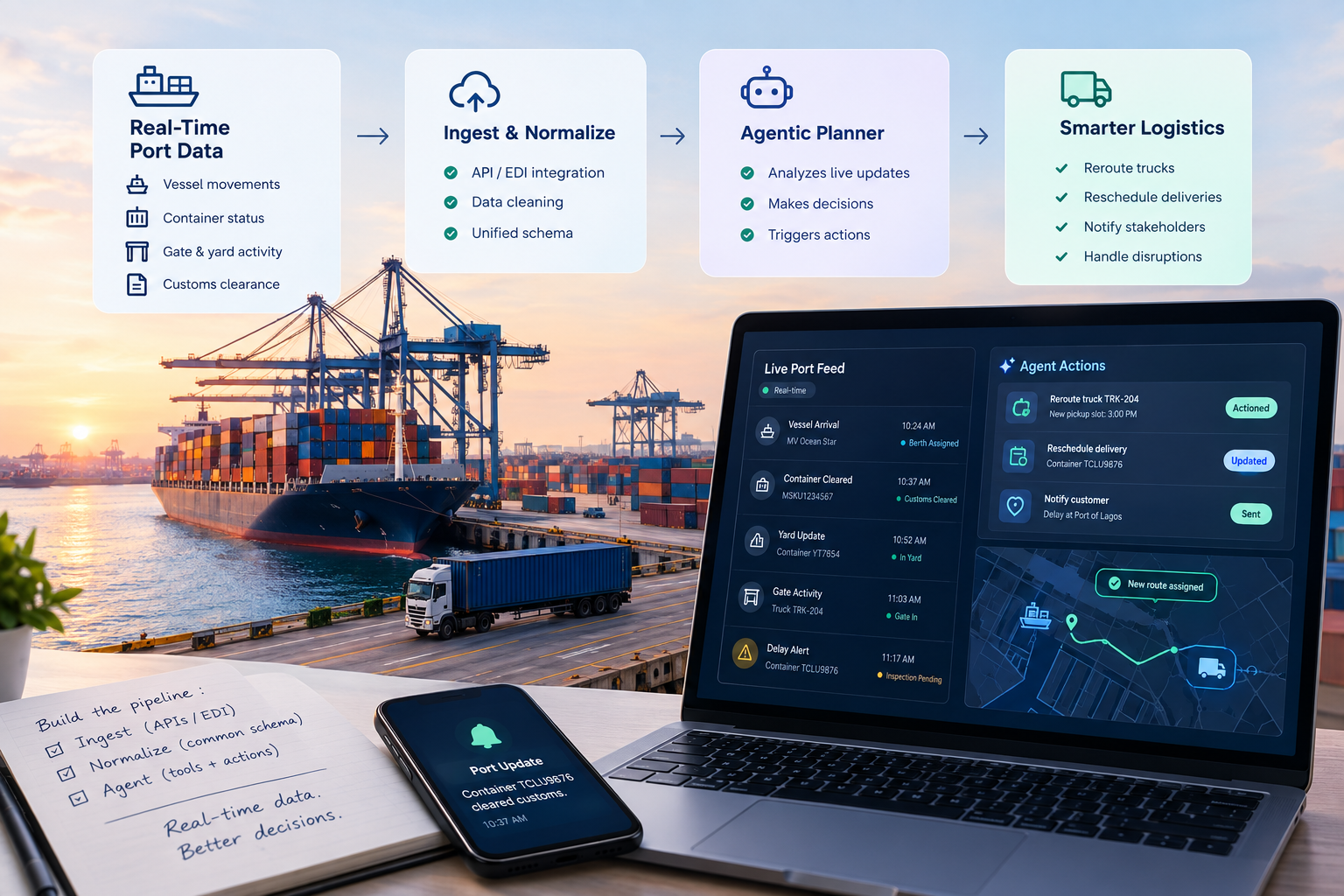
"Real-time port data" just means what's happening at the port right now. Has the ship shown up? Has a container cleared customs? Is the yard so full that another truck showing up would just be sitting in traffic for no reason?
"Agentic logistics planner" means an AI that doesn't just chat with you about logistics; it actually plans and acts. It decides things like "send truck A to grab container X at 3pm," and the important bit: it can change that plan on its own when something shifts, instead of everyone finding out three hours later that the plan was already dead on arrival.
"Integrating X into Y" is just the plumbing. It's building the pipe that carries live port updates to the AI making the calls, so it's working off what's true right now instead of what was true this morning.
So here's the plain-English version of the whole topic: how do you keep an AI delivery planner in sync with reality at the port, instead of it confidently planning around information that's already stale?
That gap, between what's actually happening and what the planning system thinks is happening, is where a suspicious number of logistics delays are born. Usually, because nobody knew about the problem. Because the person who knew wasn't the one holding the schedule.
What You'll Need Before We Start
No fancy hardware here, just a laptop and some patience for API docs. Here's the stack:
Software
- Python 3.10 or newer
- FastAPI (pip install fastapi uvicorn)
- httpx for making API calls (pip install httpx)
- Access to an LLM/agent API (OpenAI, Anthropic, or similar) with tool-calling support
- A port data provider or sandbox API (some ports and freight platforms offer test/sandbox access; if you don't have one, you can mock the responses while learning the pattern)
- A code editor (VS Code is fine)
- A terminal you're not scared of
Hardware
- Whatever you're reading this on right now is enough. This is not a machine-learning-training article; nobody's GPU needs to cry today.
Nice to have, not required
- Basic familiarity with async/await in Python
- A vague understanding of what a REST API is (if you can order food through an app, you already get the concept)
Now let's lock in.
Why This Is a Real Problem, Not Just a Buzzword Combo
Traditional freight planning software runs off a schedule that gets set once and then edited by hand whenever something changes. A dispatcher checks a port portal, maybe reads an email from a customs broker, maybe takes a phone call, then manually updates the plan. Every single one of those steps adds delay, and delay is exactly the thing you're trying to avoid.
Meanwhile, the port itself is throwing off information constantly. Container status updates, berth assignments, gate throughput, customs clearance events. Most of it never makes it to the planning system in a usable form. It just lives in a dashboard that somebody has to remember to check, assuming they even have time to.
An agentic planner flips the whole setup. Instead of a human fetching data and pushing updates by hand, the data pushes itself into the agent, and the agent replans immediately: reroute a truck, notify a customer, rebook a slot, all before a human would've even opened the dashboard tab.
Side by side, the difference looks like this:
Traditional Freight Planning
Agentic Logistics Planning
Data source
Manual checks: port portals, emails, phone calls
Live feeds: APIs, EDI, sensors
Update frequency
Whenever someone remembers to check
Continuous, as events happen
Response to disruption
Dispatcher notices, then manually replans
Agent detects and replans automatically
Typical response time
Hours, sometimes longer
Minutes, often seconds
Human's role
Executes every decision by hand
Reviews and approves flagged edge cases
The Architecture
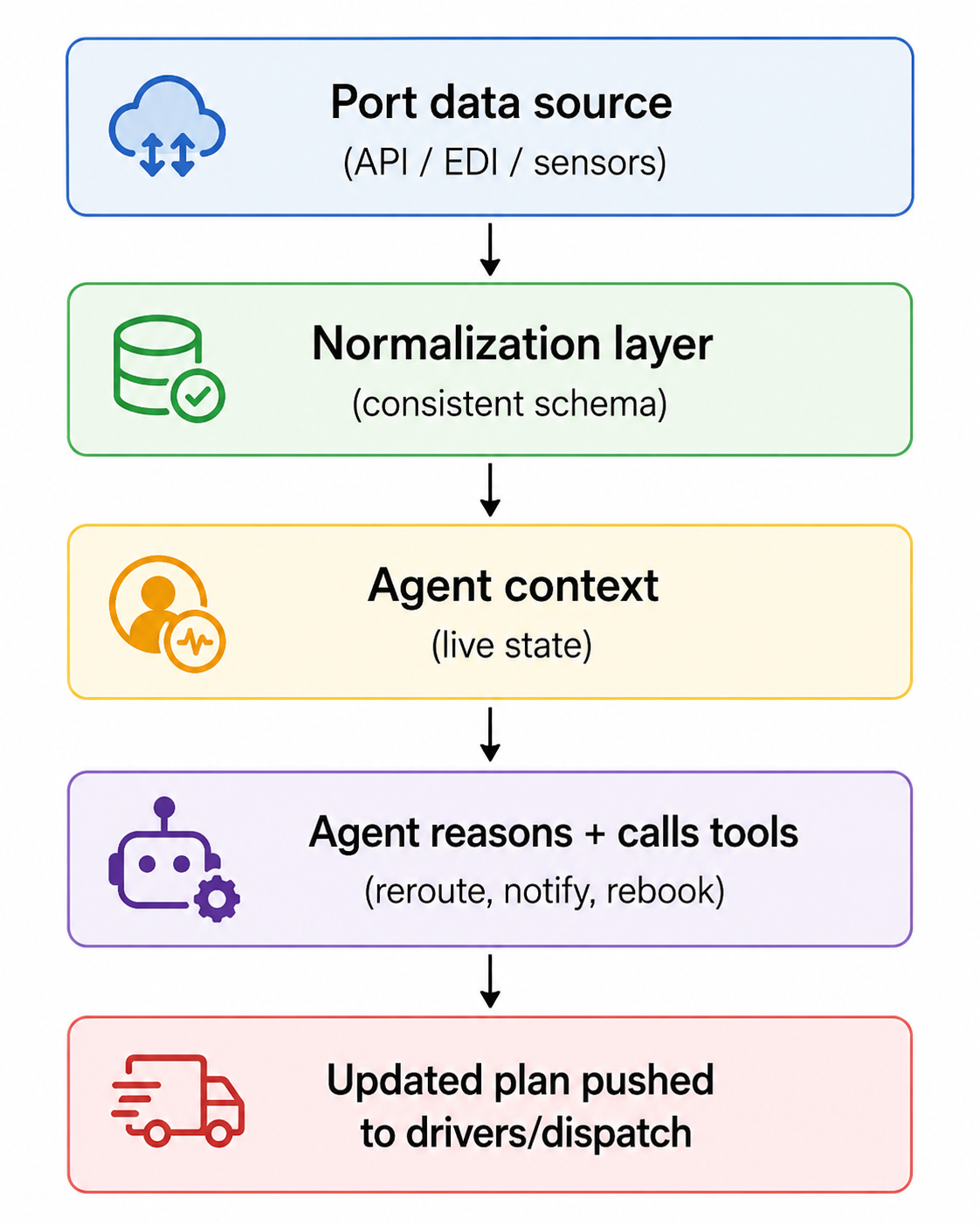
Three moving parts here, and the shape will feel familiar if you've built any kind of live-data pipeline before.
- Ingest: pull data from the port's systems (APIs, EDI feeds, or sensors like gate cameras and crane telemetry)
- Normalize: clean it into one consistent format, because no two ports agree on how to structure anything
- Act: hand it to an agent that has real tools it can use: reroute, reschedule, notify
Step 1: Pulling in the Port Data
Fair warning, ports rarely hand you a clean REST API. A lot of this still runs on EDI (Electronic Data Interchange), a format that has been technically "working" since long before most of us were born and shows no interest in retiring. For this walkthrough, assume there's an API wrapper sitting in front of whatever the port actually gives you, because writing raw EDI parsers is a whole separate horror story.
import httpx
async def get_port_events(port_id: str, since_timestamp: str):
"""
Pulls container, vessel, and gate events since the last check.
"""
url = "https://api.port-data-provider.com/v1/events"
params = {"port_id": port_id, "since": since_timestamp}
async with httpx.AsyncClient() as client:
response = await client.get(url, params=params)
response.raise_for_status()
return response.json()["events"]
This is a polling setup, which is the realistic starting point. Some port systems support webhooks or streaming, and that's genuinely better since you get pushed events instead of constantly asking "Anything new?” But most ports don't offer that yet, so build for polling first and treat push-based updates as a future upgrade.
Step 2: Normalizing the Mess
This is the unglamorous part that eats way more time than the AI bit ever will. One port calls it "vessel_eta." Another calls it "expected_arrival." A third buries it three fields deep inside an EDI segment that only makes sense to the person who designed it in 1998. Before any of this is useful to an agent, it all needs to look the same, no matter where it came from.
def normalize_event(raw_event: dict, source: str) -> dict:
"""
Converts a port-specific event format into a common schema.
"""
if source == "port_a":
return {
"type": raw_event.get("event_type"),
"container_id": raw_event.get("container_ref"),
"timestamp": raw_event.get("event_time"),
"delay_minutes": raw_event.get("delay", 0),
}
elif source == "port_b":
return {
"type": raw_event.get("category"),
"container_id": raw_event.get("cid"),
"timestamp": raw_event.get("ts"),
"delay_minutes": raw_event.get("delta_min", 0),
}
# add a branch per source you integrate with
If you're only working with one port right now, you can skip building this out fully. But design the schema like a second port is coming, because it always eventually shows up, usually right when you thought you were done.
Step 3: Feeding It to the Agent
Here's where this stops being "just a data pipeline" and starts earning the word agentic. The agent gets the normalized events as live context, plus a set of tools it's allowed to actually use: reroute a truck, notify a customer, rebook a slot.
async def run_planning_agent(current_plan: dict, new_events: list[dict]):
"""
Passes live port events to the agent and lets it decide what,
if anything, needs to change about the current delivery plan.
"""
context = {
"current_plan": current_plan,
"new_events": new_events,
}
response = await agent_client.run(
system_prompt=(
"You are a logistics planning agent. Given the current delivery "
"plan and new port events, decide if any deliveries need to be "
"rerouted, rescheduled, or flagged for human review. Only act "
"on events that materially affect the plan."
),
input=context,
tools=["reroute_truck", "reschedule_delivery", "notify_customer", "flag_for_human"],
)
return response.actions_taken
That one line in the prompt, "only act on events that materially affect the plan," matters more than it looks like it should. Skip it, and you'll end up with an agent who, reroutes an entire truck because a container shifted ten feet within the same yard. Tune what counts as "material" based on what your actual planners would care about, not what technically counts as a change.
What Breaks Once This Gets Real
A few things worth knowing before you build this for keeps, not just for a demo:
Bad data will trigger bad decisions. Port systems occasionally send wrong or duplicate events, because of computers. Before letting the agent act fully on autopilot, it's worth having it flag lower-confidence changes for a human to approve first, at least until you trust the pipeline enough to hand over the keys.
Polling frequency is a trade-off, not a setting you pick once and forget. Poll too often and you're burning through API calls and rate limits for basically nothing. Poll too rarely and you're back to the exact delay problem you built this to fix. Match the interval to how fast the port's data actually changes, not to how responsive you'd like it to feel.
Not every port even speaks the same language, literally. Some transmit data in local formats, different languages, or country-specific customs codes. If you're covering more than one region, your normalization layer needs to plan for that from day one, not get bolted on later in a panic.
FAQs
How do you handle API rate limits when polling multiple ports?
Stagger your polling instead of hitting every port's endpoint on the same schedule, and respect each provider's documented rate limit rather than assuming they're all the same. In practice, a simple per-source queue with backoff (retry with increasing delay after a 429 response) handles most of this. If you're polling more than a handful of ports, it's worth tracking rate-limit headroom per source so one aggressive port doesn't starve requests to the others.
What happens when an LLM tool call fails mid-execution?
Treat it like any other unreliable network call, because that's what it is. Wrap tool calls in retries with a capped attempt count, and have a defined fallback: if reroute_truck fails twice, the safest default is usually to flag the event for human review rather than silently dropping it or retrying indefinitely. Losing an update silently is worse than being slow.
How do you handle legacy EDI parsers in production?
Isolate them. EDI parsing logic tends to be brittle and format-specific, so keep it in its own module with heavy test coverage around the specific segments you actually use, rather than trying to build a general-purpose EDI parser. When a new port's format doesn't match what you've seen before, fail loudly and log the raw payload instead of guessing, so you can add a new mapping rather than silently misreading a field.
What if the agent's replan conflicts with a driver already en-route?
This is why the "material change" threshold matters. Give the agent visibility into which parts of the plan are already in motion (a truck that's left the yard, a driver who's confirmed a pickup) and treat those as higher-friction to change than parts of the plan that haven't started yet. A reroute for tomorrow's deliveries can happen automatically; a reroute for a truck five minutes from the gate should probably ping the driver and dispatcher before it's finalized.
The Actual Point of All This
Here's the twist: the AI was never the hard part. Models are already good enough at reasoning through "here's the situation, here's what changed, here's what should happen next." The real engineering work, the part that decides whether this whole thing holds up or quietly falls apart, is getting clean, current, consistently shaped data in front of the agent in the first place.
If you take one thing from this, an agentic system is only ever as good as what you feed it. The "agent" part is often the easy 20%. The pipeline dragging messy, real-world data into a shape it can actually use is the other 80%, and it's the part most tutorials skip because it's less fun to write about. Now you know better