
Tadiwanashe Chibonda
Building an Accessible E-Commerce Experience: Image-to-Audio with Multimodal AI in Local Languages
I hit this problem while working on the database schema and architecture for a multi-vendor e-commerce platform created for our business information systems course in university. In a multi-vendor setup, you're at the mercy of your sellers when it comes to catalog quality, and what I kept seeing was vendors uploading product photos and then just... stopping there. No description. Definitely no translated description for local buyers.
That's fine if you're a sighted, English-fluent shopper who can just look at the photo and figure it out. It's not fine if you're using a screen reader and the alt text is empty, or if you're more comfortable buying things in Shona, Ndebele, or Swahili than in English. At that point the platform just doesn't work for you, and it's not because anyone decided to exclude you, it's because writing five language versions of every product description isn't something you can reasonably ask a small vendor to do.
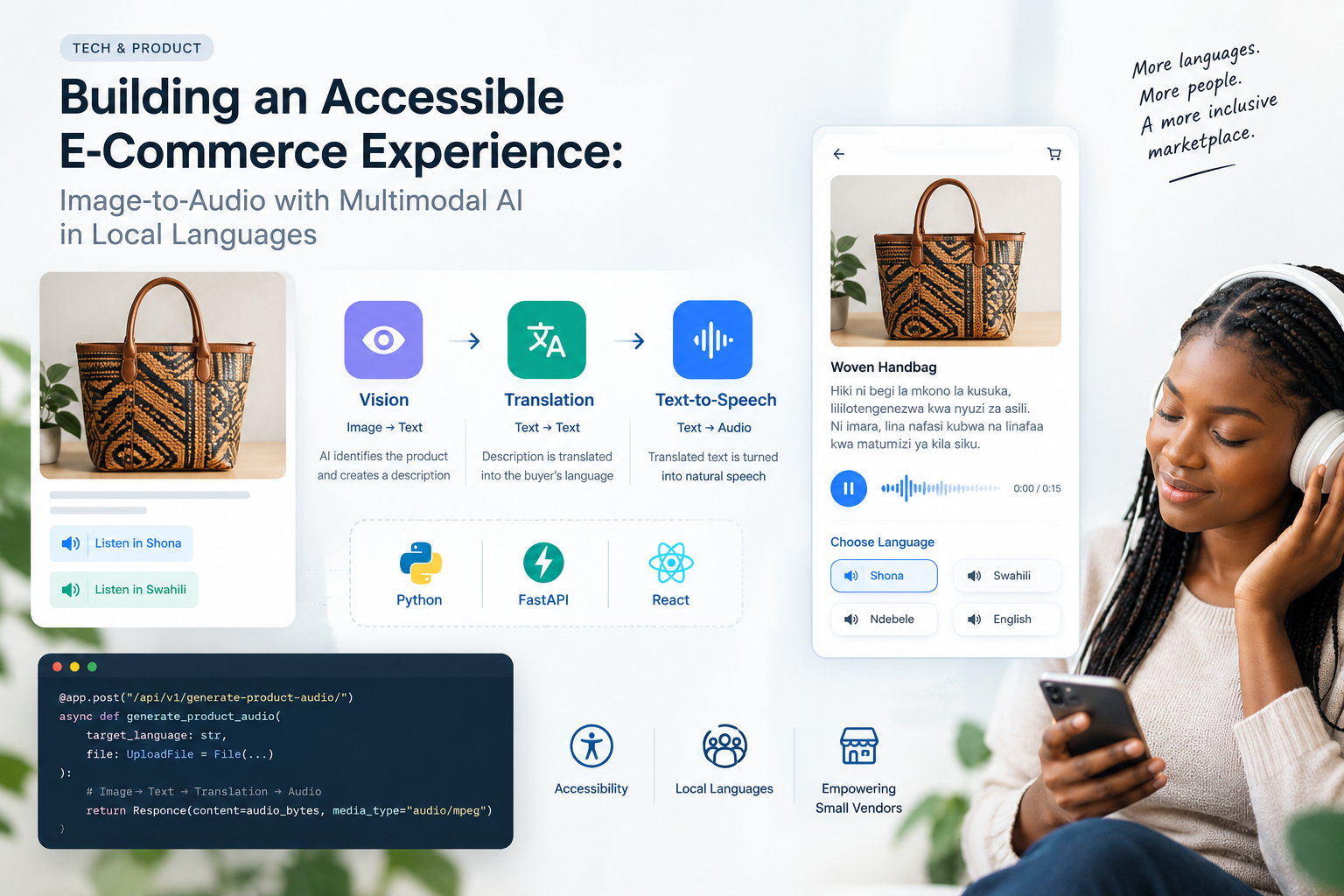
So instead of asking vendors to do more work, I built a pipeline that does it for them: take the product image, figure out what's in it, translate that into the buyer's language, and hand back an audio clip they can actually listen to.
Here's how I built it, using Python, FastAPI, and React.
The Architecture
Rather than wiring this straight into the existing e-commerce codebase and making everything more fragile, I split it out as its own microservice. Three steps, chained together:
Image → text: a vision model looks at the product photo and writes a description
Text → text: that description gets translated into whatever local language the buyer picked
Text → audio: the translated text gets turned into speech
FastAPI was an easy choice for the backend. You're making three sequential calls to third-party APIs here, and if you're not doing that asynchronously, your response times get ugly fast.
Step 1: The FastAPI Setup (Python)
First, the dependencies:
pip install fastapi uvicorn httpx python-multipart
Within the base app, this endpoint takes in whatever image the vendor uploaded (or that the buyer is currently viewing) and kicks off the pipeline:
from fastapi import FastAPI, UploadFile, File, HTTPException
from fastapi.responses import Response
import httpx
import os
app = FastAPI(title="Accessible E-Commerce Audio API")
# Keep these in your environment config, not hardcoded
VISION_API_KEY = os.getenv("VISION_API_KEY")
TRANSLATION_API_KEY = os.getenv("TRANSLATION_API_KEY")
TTS_API_KEY = os.getenv("TTS_API_KEY")
@app.post("/api/v1/generate-product-audio/")
async def generate_product_audio(
target_language: str,
file: UploadFile = File(...)
):
if not file.content_type.startswith("image/"):
raise HTTPException(status_code=400, detail="File must be an image.")
image_bytes = await file.read()
Step 2: Getting the Vision Model to Actually Sell the Product (Python)
This is the step I spent the most time tuning. It's easy to get a vision model to say "a red shirt", it's harder to get it to say something that reads like an actual product description. The prompt matters a lot more than I expected going in.
async def analyze_product_image(image_bytes: bytes) -> str:
"""
Sends the product image to a vision model and returns a description.
"""
url = "https://api.example-vision-ai.com/v1/analyze"
headers = {"Authorization": f"Bearer {VISION_API_KEY}"}
prompt = (
"You are an e-commerce assistant. Describe this product accurately "
"in 2-3 sentences. Mention colors, materials, and potential use cases. "
"Keep the language simple and accessible for a buyer."
)
# Depending on the provider, you'll likely need to base64-encode image_bytes here
payload = {
"image": "base64_encoded_string",
"prompt": prompt
}
async with httpx.AsyncClient() as client:
response = await client.post(url, json=payload, headers=headers)
if response.status_code != 200:
raise HTTPException(status_code=500, detail="Vision AI processing failed")
return response.json().get("description", "Product description unavailable.")
Models like GPT-4o or Gemini 1.5 Pro handle this well enough out of the box, but don't skip the prompt-tuning step, the default output tends to read flat.
Step 3: Translating It (Python)
Once you've got an English description, it needs to actually reach the buyer in their language. I used a translation service with decent African-language coverage (Google Cloud Translation and Meta's SeamlessM4T are both worth looking at here, coverage varies a lot between providers, so test with your actual target languages before committing).
async def translate_text(text: str, target_language: str) -> str:
"""
Translates the product description into the buyer's language.
"""
url = "https://api.example-translation.com/v1/translate"
headers = {"Authorization": f"Bearer {TRANSLATION_API_KEY}"}
payload = {
"text": text,
"source": "en",
"target": target_language
}
async with httpx.AsyncClient() as client:
response = await client.post(url, json=payload, headers=headers)
if response.status_code != 200:
raise HTTPException(status_code=500, detail="Translation service failed")
return response.json().get("translated_text", text)
Step 4: Turning Text Into Something Worth Listening To (Python)
Last step- text to speech. Nobody wants to shop while listening to a voice that sounds like a GPS from 2009, so it's worth actually comparing providers on voice quality before locking one in.
async def generate_audio(text: str, language_code: str) -> bytes:
"""
Converts translated text into audio.
"""
url = "https://api.example-tts.com/v1/synthesize"
headers = {"Authorization": f"Bearer {TTS_API_KEY}"}
payload = {
"text": text,
"language": language_code,
"voice_type": "natural-female"
}
async with httpx.AsyncClient() as client:
response = await client.post(url, json=payload, headers=headers)
if response.status_code != 200:
raise HTTPException(status_code=500, detail="TTS generation failed")
return response.content
Putting the Pipeline Together (Python)
Now the three functions get chained inside the endpoint. Because everything's async, the API doesn't choke even if a bunch of requests come in at once:
@app.post("/api/v1/generate-product-audio/")
async def generate_product_audio(
target_language: str,
file: UploadFile = File(...)
):
image_bytes = await file.read()
english_desc = await analyze_product_image(image_bytes)
local_desc = await translate_text(english_desc, target_language)
audio_bytes = await generate_audio(local_desc, target_language)
return Response(content=audio_bytes, media_type="audio/mpeg")
Wiring It Up on the Frontend (Javascript)
On the product card, I added a simple "listen in your language" option. Buyer taps it, it hits the FastAPI endpoint, and plays the result:
import React, { useState } from 'react';
const AccessibleProductCard = ({ product }) => {
const [isLoading, setIsLoading] = useState(false);
// Simplified for the demo — in production you'd pass an image URL
// rather than re-uploading the file each time.
const handleListen = async (language) => {
setIsLoading(true);
const formData = new FormData();
formData.append('file', product.imageFile);
try {
const response = await fetch(`http://localhost:8000/api/v1/generate-product-audio/?target_language=${language}`, {
method: 'POST',
body: formData,
});
if (response.ok) {
const audioBlob = await response.blob();
const audioUrl = URL.createObjectURL(audioBlob);
const audio = new Audio(audioUrl);
audio.play();
}
} catch (error) {
console.error("Failed to fetch audio stream:", error);
} finally {
setIsLoading(false);
}
};
return (
<div className="product-card border p-4 rounded-lg shadow-sm">
<img src={URL.createObjectURL(product.imageFile)} alt="Vendor Product" className="w-full h-48 object-cover"/>
<div className="mt-4 flex gap-2">
<button
disabled={isLoading}
onClick={() => handleListen('sn')}
className="bg-blue-600 text-white px-3 py-1 rounded"
>
{isLoading ? 'Processing...' : 'Listen in Shona'}
</button>
<button
disabled={isLoading}
onClick={() => handleListen('sw')}
className="bg-green-600 text-white px-3 py-1 rounded"
>
{isLoading ? 'Processing...' : 'Listen in Swahili'}
</button>
</div>
</div>
);
};
export default AccessibleProductCard;
What Actually Bit Me in Production
A couple of things showed up once this moved past "works on my machine":
Cost and caching. Running vision + translation + TTS on every single page load is a great way to burn through your API budget for no reason. The fix is boring but necessary: run the pipeline once, in the background, whenever a vendor uploads a new image. Save the resulting audio files to S3, store the URLs, and just serve those. You only pay for generation once per product per language, not once per page view.
Latency, if you don't cache. If a buyer requests a language you haven't pre-generated yet, you're chaining three API calls live, which lands somewhere around 3–5 seconds. That's long enough to feel broken. Streaming the audio back over WebSockets instead of waiting for the whole file helps, but honestly, the real fix is just making sure your common languages are pre-cached so this path rarely gets hit.
Where This Leaves Me
I don't think of this as an accessibility checkbox, it's closer to fixing a gap the platform itself created. Vendors were never going to write five language versions of every listing, and I couldn't blame them for it. The alternative was just letting a chunk of buyers get left out.
If you're building anything with a similar vendor-supplied-content problem, it's worth asking early: who's actually being excluded by relying on that content as-is, and where could a model reasonably fill the gap? In this case, the tools to do it- vision, translation, TTS- were all already sitting there, off the shelf. The work was just in stitching them together and making sure the result didn't fall over at scale.