Remote IT Companies' Operations: Security Protocols for Designated Devices
Remote work gives IT companies greater flexibility, but it also expands the security risks associated with devices accessing corporate systems from outside the traditional workplace. This article explores the essential security protocols for designated remote devices, covering access control, MFA, asset inventory, encryption, patch management, endpoint protection, secure remote access, BYOD, monitoring, incident response, and employee awareness. Drawing on guidance from NIST, CISA, and CIS, it explains how organizations can build a layered security strategy that keeps remote devices protected, compliant, and capable of being isolated when compromised.

Remote IT Companies' Operations: Security Protocols for Designated Devices
Remote IT operations involve employees and other authorized users performing organizational activities outside the traditional office environment. These activities may include software development, system administration, cloud management, customer support, database administration, communication, and access to confidential business information.
The major challenge is that remote devices connect through networks and locations that may not be controlled by the organization. A compromised laptop, stolen smartphone, weak password, unsecured Wi-Fi connection, or outdated application can become an entry point into corporate systems.
NIST's Guide to Enterprise Telework, Remote Access, and Bring Your Own Device (BYOD) Security emphasizes the importance of securing remote-access technologies and endpoint devices. Consequently, remote IT companies need a comprehensive security strategy that protects both users and devices.
Here are key components of remote device security and what it covers:
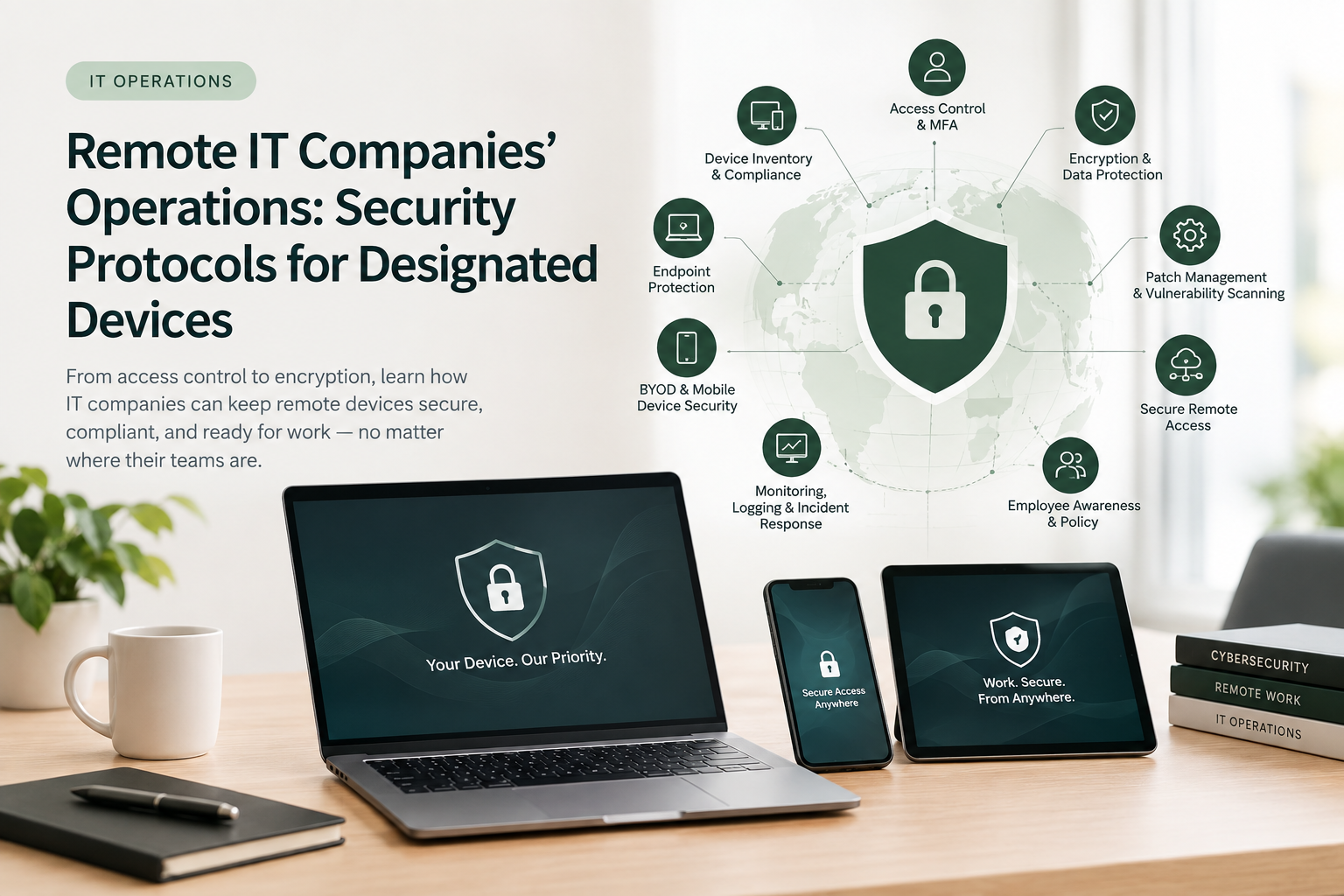
Access Control, Authentication, and Asset Inventory
Remote security has to evaluate not just who is asking for access, but what device they're asking from. An organization may require a device to be officially registered, running current security updates, protected by active endpoint software, encrypted, firewalled, properly configured, and free of jailbreaking or root access before granting entry. This device-aware approach prevents legitimate credentials from being used through insecure or compromised hardware and reflects modern Zero Trust principles.
On the identity side, password-only authentication is increasingly inadequate — passwords can be stolen through phishing, malware, credential stuffing, or social engineering. Multi-factor authentication (MFA) closes much of that gap by requiring multiple forms of evidence before access is granted. Access should also follow least privilege: employees receive only the permissions their role requires, not broader access just because they happen to work in IT. Accounts and privileges need regular review, especially when employees change roles or leave, and administrative accounts warrant extra protection given the outsized damage a compromised one can cause.
None of this works without an accurate, continuously updated inventory of every device that can touch organizational resources — device ID, assigned owner, OS and version, installed security software, encryption status, management status, patch status, authorized applications, and access privileges. Without it, security teams can't tell what devices exist, who uses them, what they can reach, or whether they're compliant — which means vulnerable or unauthorized devices can sit inside the environment unnoticed.
Encryption and Data Protection
Remote employees frequently handle confidential information outside organizational premises. If a laptop or smartphone is lost or stolen, unencrypted information could be exposed. Full-disk encryption protects data at rest when a device goes missing, and data moving between remote devices and corporate systems should travel over secure communication protocols — NIST recommends specific protections for both telework devices and remote-access connections.
Beyond encryption itself, companies need policies covering the storage of confidential data, use of removable storage devices, cloud storage and file-sharing services, printing of sensitive information, transfer of corporate data to personal devices, and disposal of retired equipment.
Patch and Vulnerability Management
Outdated operating systems and applications may contain exploitable vulnerabilities, which is why remote IT companies need a formal patch-management process. In practice, that means identifying vulnerable devices, prioritizing critical vulnerabilities, testing updates where necessary, deploying patches remotely, verifying successful installation, flagging devices that remain unpatched, and restricting access where serious requirements aren't met.
CISA recommends continuing patch and vulnerability-management activities in telework environments specifically, and encourages automatic or centrally managed updates where practical — patch compliance should be centrally monitored rather than left to individual employees to remember.
Endpoint Protection
Designated devices need effective endpoint security: anti-malware software, endpoint detection and response (EDR), host-based firewalls, application controls, and behavioral threat detection. These tools identify malicious software, suspicious activity, ransomware, and unauthorized changes. They should be centrally managed so IT personnel can confirm protection is active across every designated device, and alerts should be investigated promptly — particularly those involving privileged accounts, sensitive information, or critical systems.
Secure Remote Network Access
Remote employees need secure connections into organizational systems, which depending on the environment may involve VPNs, secure gateways, cloud security solutions, or Zero Trust architectures. NIST recommends specific security controls for remote-access servers, client software, authentication, authorization, and communications.
Zero Trust Architecture, increasingly the default approach, does not automatically trust a user or device just because it's connected to a particular network. Instead, access decisions weigh identity, device security posture, the resource being requested, and other contextual factors — the central principle being continuous verification rather than assumed trust.
BYOD and Mobile Device Security
Some organizations let employees use personal smartphones, tablets, or computers for work. BYOD can cut equipment costs and improve flexibility, but it introduces additional security and privacy risk. Where it's permitted, organizations should set clear requirements: approved device types, minimum OS versions, MFA, encryption, security software, mobile-device management (MDM), rules on storing corporate data, procedures for lost or stolen devices, remote access termination, and employee privacy protections. For highly sensitive systems, company-managed devices are often preferable simply because the organization retains more control over configuration and data protection.
Whether a device is company-issued or personal, mobile-specific controls matter: device encryption, strong PINs or biometric authentication, automatic screen locking, remote lock or wipe capability, MDM enrollment, approved application policies, regular OS updates, and restrictions on compromised or modified devices. Mobile devices belong in the same asset inventory and monitoring program as laptops and desktops.
Monitoring, Logging, and Incident Response
Detecting suspicious activity across remote devices requires collecting and analyzing logs from endpoint devices, authentication systems, cloud applications, remote-access systems, firewalls, administrative accounts, and security platforms. Warning signs include repeated failed logins, unusual access patterns, unexpected data transfers, unauthorized software installations, disabled security controls, and access from unusual locations. Centralized monitoring is what lets security teams investigate incidents efficiently and scope which devices and systems were affected.
Even strong controls can't guarantee every device stays secure, so organizations need a defined incident-response process: identify the device and user, restrict its access, preserve relevant evidence and logs, investigate, determine whether credentials were compromised, reset affected credentials, remove malicious software or reimage the device, restore it to an approved configuration, document the incident, and feed lessons learned back into policy. NIST Cybersecurity Framework 2.0 — organized around Govern, Identify, Protect, Detect, Respond, and Recover — offers a useful structure for managing all of this.
Employee Awareness, Governance, and Policy
Employees are an essential part of remote cybersecurity, and even sophisticated technical controls can be undermined by unsafe behavior. Regular training should cover phishing and social engineering, password security, MFA, safe use of public Wi-Fi, protection of confidential information, safe application installation, and how to report lost devices or suspicious activity. Employees need to understand that cybersecurity responsibilities apply regardless of where they work.
Technical controls should be backed by formal policy and management oversight — a remote-device security policy defining acceptable devices, security requirements, access controls, monitoring, incident reporting, BYOD requirements, and device disposal. The NIST Cybersecurity Framework 2.0 again provides a solid governance structure, and policies should be reviewed regularly since technologies, business processes, and threats keep changing.
Conclusion
Remote IT operations offer real benefits — flexibility, reduced dependence on physical offices, access to a wider workforce, and improved business continuity. But those benefits come with cybersecurity challenges, because employees and devices now operate across diverse networks and environments that the organization doesn't control.
Securing designated devices should be treated as a fundamental part of organizational cybersecurity, built from: asset inventory, secure configuration, strong authentication, least-privilege access, device compliance, encryption, patch management, endpoint protection, secure remote access, BYOD controls, monitoring, incident response, employee training, and governance.
Organizations should adopt a layered approach rather than relying on any single security technology. Combined, NIST guidance, CIS Critical Security Controls, and CISA recommendations provide a strong foundation for effective remote-device security. Ultimately, every device accessing company resources should be known, authorized, securely configured, regularly updated, continuously monitored, and capable of being isolated the moment it's compromised. Getting these fundamentals right lets remote IT companies keep the productivity and flexibility remote work offers, without carrying an outsized share of the risk.
FAQs
How do you remote-wipe a lost BYOD device without invading employee privacy?
Most mobile device management (MDM) platforms support selective wipe, which removes only corporate data, apps, and accounts from a personal device while leaving personal photos, messages, and apps untouched. This depends on having containerized corporate data (a separate work profile or app sandbox) set up from day one — a full wipe should be reserved for company-owned devices or BYOD arrangements where the employee has explicitly consented to it in the BYOD policy.
What's the minimum endpoint security stack a small remote-first startup actually needs?
At minimum: full-disk encryption enabled by default, MFA on every account (not just email), a centrally managed anti-malware/EDR tool, automatic OS and application patching, and a password manager to eliminate reused credentials. A basic MDM tool to enforce these settings and enable remote wipe rounds this out — most of these are available as low-cost or bundled tiers well before a company needs a full enterprise security suite.
Do employees need MFA if they're already using a company VPN?
Yes. A VPN secures the network connection, but it doesn't verify that the person using valid credentials is actually the authorized employee. Credential theft happens independently of network security, which is why MFA and VPN access are complementary controls, not substitutes for each other — this is also the logic behind Zero Trust, which assumes no connection is automatically trustworthy.
How often should patch and vulnerability scans run for a distributed remote workforce?
Critical vulnerabilities should be patched within days of a fix becoming available — some frameworks recommend 72 hours for actively exploited flaws. Routine OS and application patches are typically fine on a weekly or bi-weekly automated cycle. The key operational detail is centralized visibility: the security team needs a live dashboard of patch compliance across all devices, rather than relying on individual employees to install updates on their own schedule.
References
Center for Internet Security. (2026). CIS Critical Security Controls. CIS.
Center for Internet Security. (2026). Inventory and Control of Enterprise Assets. CIS.
Center for Internet Security. (2026). Secure Configuration of Enterprise Assets and Software. CIS.
Cybersecurity and Infrastructure Security Agency. (2020). Telework Essentials. U.S. Department of Homeland Security.
National Institute of Standards and Technology. (2016). Souppaya, M. P., & Scarfone, K. Guide to Enterprise Telework, Remote Access, and Bring Your Own Device (BYOD) Security (NIST Special Publication 800-46 Rev. 2). NIST.
National Institute of Standards and Technology. (2024). Pascoe, C., Quinn, S., & Scarfone, K. The NIST Cybersecurity Framework (CSF) 2.0. NIST.
National Institute of Standards and Technology. (2025). NIST Cybersecurity Framework. NIST.