Building the Ultimate Developer Workspace: The Complete VS Code Extension Ecosystem
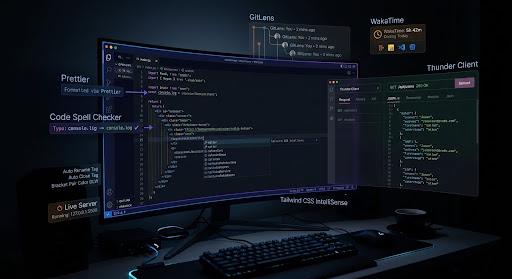
Building the Ultimate Developer Workspace: The Complete VS Code Extension Ecosystem is a practical guide to the Visual Studio Code extensions that can transform a basic code editor into a more efficient, developer-focused workspace. Drawing from real-world web development experience, the article explores essential extensions for code formatting, error detection, API testing, live development, markup automation, CSS workflows, Git, and productivity tracking. From Prettier and Error Lens to Thunder Client, GitLens, Tailwind CSS IntelliSense, and WakaTime, each extension is explained in terms of the specific development bottleneck it addresses and how it can improve everyday coding workflows. The guide also includes a summary matrix to help developers quickly identify which tools best fit their needs. Whether you're setting up VS Code for the first time or looking to optimize an existing development environment, this article provides a practical extension ecosystem for reducing repetitive work, improving code quality, and maintaining focus while building web applications.
Building the Ultimate Developer Workspace: The Complete VS Code Extension Ecosystem
Visual Studio Code( Vs Code ) is built around a lightweight core editor designed for fast startup speeds and minimal resource usage. While i have been coding for the past few years i have learnt about the best VS Code that you need if you are a web developer
In this article I will share with you the exact extensions that help me on a day to day basis in my job . They are not just tools, they turn the Visual Studio Code environment to an automated development machine if used correctly.
1. Code Formatting & Real-Time Quality Control
Prettier – Code Formatter
Code formatting consumes valuable energy during development and during pull request reviews. Prettier solves this by taking complete ownership of code presentation across your entire development environment. No more debates among your team memebers
· Automated Formatting on Save: Prettier parses your code into an abstract syntax tree and reprints it according to established stylistic rules every time you save a file. Indentation, line wrapping, single versus double quotes, and trailing commas are adjusted automatically.
· Elimination of Cognitive Fatigue: Developers often spend micro-seconds adjusting spacing, lining up object keys, or wrapping long lines manually. Delegating this task to Prettier allows you to keep your mental focus entirely on application logic.
· Team-Wide Consistency: By committing a single shared configuration file to your repository, every developer working on the codebase produces visually identical code, eliminating unnecessary diff clutter in pull requests.
Recommended Setting : "editor.formatOnSave": true
Code Spell Checker
A single typo in a variable identifier, database key, or API route string can cause hours of frustrating debugging, often yielding confusing error messages. Code Spell Checker behaves like our text auditor. It does :
· Typo-Driven Bug Identification: This extension scans source code, strings, markup, and internal documentation, drawing squiggly underlines beneath unrecognized words(E.g words not in the correct camelCase, PascalCase, snake_case, or UPPER_CASE ) directly inside the editor panel.
· Project Specific Dictionaries: You can easily add proprietary terms, API keys, brand names, or project-specific terminology to a project-level dictionary to avoid false positives across your team.
Error Lens
VS Code natively reports syntax errors and linting warnings, but accessing the detail usually requires hovering over squiggly lines with a mouse or constantly checking the bottom Problems panel. Error Lens makes accessing errors easier.
· Inline Error Message Rendering: Error Lens intercepts language server diagnostic messages and projects the full text of errors, warnings, and hints directly onto the line of code where they occur.
· Full-Line Background Highlighting: Entire lines containing errors are visually color-coded, allowing you to catch syntax breaks, missing imports, or missing brackets the exact moment you finish typing a line.
· Faster Feedback Loops: Eliminating the need to use a mouse hover to read diagnostic messages saves hundreds of micro-interactions every working day.
2. API Testing & Local Server Environments
Thunder Client
Switching between your code editor and external API testing applications like Postman or Insomnia interrupts deep work states and consumes significant system memory. Thunder Client brings a full HTTP client directly inside your editor layout.
· Zero-Context-Switching API Testing: Thunder Client opens as a tab inside VS Code. You can write your backend endpoints or frontend data-fetching hooks in one split window and test the network responses directly beside them.
· Lightweight System Footprint: Because it is built specifically as a native VS Code extension, Thunder Client launches instantly and consumes a fraction of the memory required by heavy standalone Electron applications.
· Environment & Collection Management: It fully supports request collections, environment-specific variables, bearer tokens, headers, and automated response testing scripts, handling end-to-end API workflows seamlessly.
Live Server
Developing client-side web applications without hot-reloading forces you into a repetitive cycle of editing code, switching to a web browser, and manually reloading the page. Live Server automates this entire feedback loop.
· Instant Live Reloading: The moment you save changes to an HTML, CSS, or client-side JavaScript file, Live Server signals the browser to update immediately without a manual refresh.
· Local Development Host: It launches a local local-host server instance, allowing you to correctly test relative file paths, fetch API requests, and web storage features that are blocked when opening files directly via the local file system.
· Remote Network Previewing: Live Server exposes a local IP address and port, enabling you to connect mobile devices, tablets, or secondary screens on the same Wi-Fi network to test responsive layouts live.
3. Markup Automation & Syntax Speed Multipliers
Auto Rename Tag
Editing complex HTML or component structures often leads to broken markup when you rename an opening tag but forget to update its corresponding closing tag elsewhere in the file.
· Synchronized Tag Renaming: Changing the name of an opening tag instantly changes its matching closing tag in real time, ensuring your markup structure remains valid as you edit.
· Support for Custom Components: Works seamlessly across standard HTML, XML, and modern component frameworks like React, Vue, and Svelte.
· Prevention of Layout Collapse: Hunting down mismatched tags in deeply nested tree structures is a common source of layout bugs. Automating tag pairing eliminates this structural risk entirely.
JavaScript (ES6) Code Snippets
Writing modern JavaScript involves repeating common boilerplate structural patterns. Code snippets turn repetitive keystrokes into quick short-form triggers.
· Instant Structural Expansion: Short trigger keywords expand into complete, syntactically correct code blocks, including modular import statements, export declarations, console logs, and array iteration methods.
· Framework Versatility: Provides triggers for modern ES6+ features, TypeScript signatures, and React component patterns, standardizing coding structure across files.
· Physical Effort Reduction: Replacing long manual code declarations with 2-to-3-character trigger phrases protects developers from repetitive typing strain during long sessions.
Bracket Pair Color DLW
Deeply nested functions, complex conditional statements, and large configuration objects create dense clusters of identical brackets, making scope boundaries hard to trace visually.
· Visual Scope Colorization: Colors matching pairs of parentheses, square brackets, and curly braces with distinct themes, making it easy to identify where code blocks open and close.
· Global Setting Control: Provides a straightforward command palette action to toggle global bracket coloring options across your workspace whenever you need extra visual clarity.
· Syntax Error Spotting: Missing or extra brackets stand out immediately due to mismatched color patterns, allowing you to catch structural syntax errors before running your build tools.
Path Intellisense
Importing modules, local files, images, or assets into your code requires precise relative file paths. Misspelling a path results in broken builds or missing assets.
· Autocompleting File Paths: As soon as you type a relative file path inside an import statement or file attribute, Path Intellisense opens an autocomplete menu listing all matching files and folders in that directory.
· Hidden File & Subfolder Navigation: Allows you to navigate up and down nested project folder trees directly from your keyboard without opening the sidebar file explorer.
· Prevents Broken File References: Guarantees that every imported asset or module exists at the designated path, saving you from missing-module compilation errors.
4. CSS Frameworks & UI Acceleration
Tailwind CSS IntelliSense
Utility-first CSS frameworks like Tailwind accelerate styling, but remembering hundreds of class names can slow down development. This official extension brings full IDE intelligence to utility classes.
· Autocomplete Class Suggestions: Offers intelligent class suggestions for utility names, variant prefixes, and custom theme configurations as you type inside your markup.
· Hover Preview of Generated CSS: Hovering over any utility class displays a tooltip showing the exact underlying CSS rules generated by that class.
· Linting & Syntax Highlighting: Highlights invalid utility class names, duplicate utility definitions, and syntax conflicts directly inside your class attributes before you render the page.
5. Source Control, Workspace Visuals, & Navigation
GitLens – Git Supercharged
Git integration inside default VS Code is basic. GitLens adds powerful inline blame annotations, repository graphs, and even lets you visualize commit history by file or author.
· Inline Git Blame Annotations: Displays subtle authorship details at the end of the current line, showing who last modified that line of code, in which commit, and how long ago.
· File & Line History Exploration: Allows you to step backward and forward through a file's edit history to see how code evolved over time without opening terminal command logs.
· Rich Revision Comparisons: Side-by-side visual diff views allow you to compare branches, commits, or working changes instantly to understand the exact impact of updates.
6. Productivity & Time Analytics
WakaTime
Optimizing your developer workflow requires clear data on how you spend your coding time. WakaTime provides passive metric tracking generated directly from your editing activity.
· Automatic Passive Time Auditing: Runs quietly in the background, measuring time only when you are actively typing or editing code, filtering out idle time when the editor is simply left open.
· Detailed Project & Language Breakdown: Categorizes your active editing time by project, branch, programming language, and specific file type, generating clean visual reports.
· Productivity Baseline Tracking: Provides clear, data-driven metrics to help you assess your focus time, evaluate project estimates, and identify productivity bottlenecks over time.
Ecosystem Summary Matrix
Extension
Category
Primary Developer Bottleneck Solved
Core Advantage
Prettier
Quality & Formatting
Inconsistent code styles and manual formatting
Formats code automatically on save according to shared rules
Code Spell Checker
Quality & Formatting
Hidden typos in variable names causing runtime bugs
Underlines misspelled identifiers and strings in real time
Error Lens
Quality & Formatting
Slow diagnostic feedback requiring mouse hovers
Projects full error text inline directly onto broken lines
Thunder Client
Network & API
Context switching between editor and external API apps
Native, lightweight HTTP client for testing endpoints in-editor
Live Server
Network & API
Manual browser refreshes after every file edit
Serves local files with instant live-reloading on save
Auto Rename Tag
Markup Efficiency
Mismatched HTML tags during structural refactoring
Synchronizes closing tag edits with opening tag edits
JS ES6 Snippets
Markup Efficiency
Tedious typing of modern JavaScript boilerplate
Expands short keywords into full code blocks instantly
Bracket Pair Color DLW
Markup Efficiency
Visual scope confusion in nested callbacks/objects
Colors matching bracket pairs to clearly delineate block scope
Path Intellisense
Markup Efficiency
Misspelled relative paths breaking asset imports
Autocompletes filenames and paths inside import statements
Tailwind CSS
CSS & UI Tools
Memorizing utility class names and syntax rules
Provides inline class completion, hover previews, and linting
GitLens
Source Control
Opaque git history requiring terminal searches
Shows inline blame, commit history, and line-by-line diffs
WakaTime
Analytics & Focus
Lack of visibility into daily coding time allocation
Audits active development hours and language usage passively
Building a high-performance editing environment is an ongoing process of refining your tools. By combining automated formatting, inline error detection, in-editor API testing, markup completion, and visual workspace cues, this collection turns VS Code into an engine tailored for deep focus and uninterrupted development flow.