
Jay Victor
Jay is a mobile and full-stack developer passionate about building scalable Flutter applications and modern backend systems with Node.js and MongoDB. He enjoys simplifying complex technical concepts and helping developers understand architecture, performance, and clean code practices.
Article by Gigson Expert
As Android applications become richer and more interactive, managing UI state, user intent, and data flow becomes increasingly complex. Over the years, several architectural patterns have emerged to address this challenge—MVC, MVP, MVVM, and more recently, MVI.
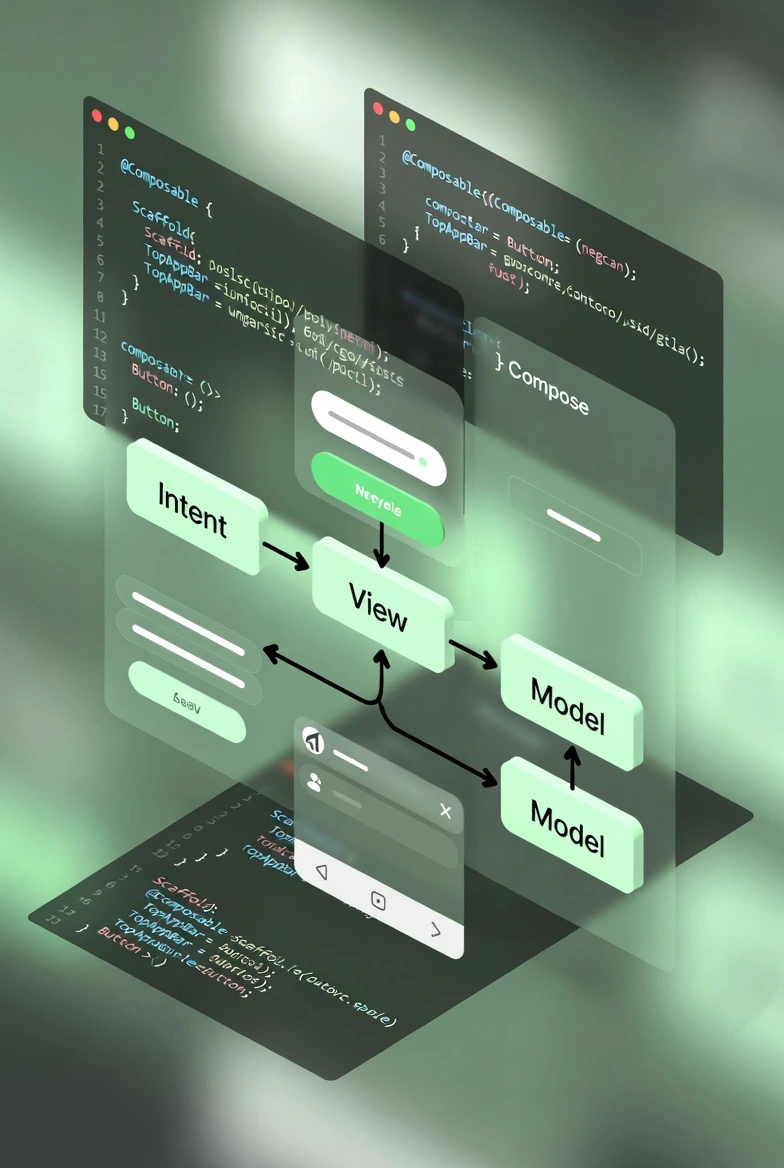
MVI (Model–View–Intent) is a reactive, predictable, and test-friendly architectural pattern built around unidirectional data flow. It eliminates ambiguity around how data moves through an application and how UI updates occur, which makes it particularly well-suited for modern Android development with Jetpack Compose.
In this guide, we will explore what MVI is, how it differs from MVVM and MVP, why it is gaining traction, and how to implement it effectively in real-world Android applications.
What is MVI Architecture?
Model–View–Intent (MVI) is an architectural pattern where:
- Users express Intents (actions or events)
- A ViewModel (Reducer) processes those intents
- A new State is produced
- The UI renders purely based on that state
The key idea is that the UI is a pure function of state. Whenever the state changes, the UI re-renders automatically. This approach enforces a single direction of data flow and a single source of truth.
Unidirectional Data Flow
User Action → Intent → ViewModel (Reducer) → New State → UI Render
- Events flow upward (UI → Intent → ViewModel)
- State flows downward (ViewModel → UI)
This predictability is one of the primary reasons MVI pairs so naturally with Jetpack Compose.
MVI vs MVP vs MVVM
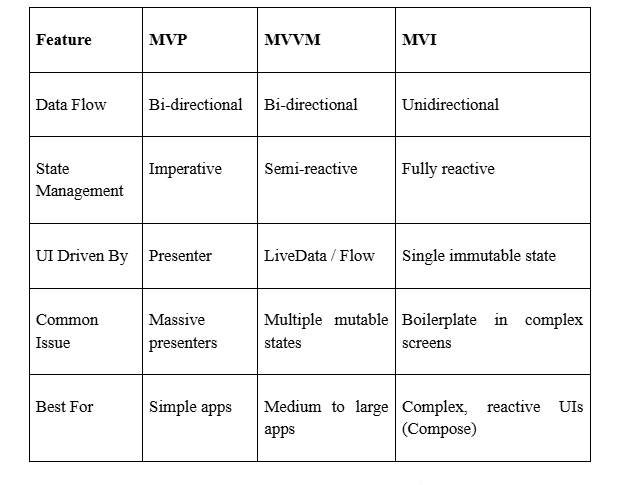
In MVVM, it is common to expose multiple observable fields:
val name = MutableStateFlow("")
val isLoading = MutableStateFlow(false)
val error = MutableStateFlow<String?>(null)
val items = MutableStateFlow(emptyList<Item>())
This approach can lead to:
- Inconsistent UI states
- Missed updates
- Hard-to-reproduce bugs
MVI addresses this by modeling the entire screen with a single immutable state object:
data class ScreenState(
    val name: String,
    val isLoading: Boolean,
    val error: String?,
    val items: List<Item>
)
At any moment, the UI reflects one well-defined state snapshot.
Core Principles of MVI
1. Unidirectional Data Flow
All interactions follow a single loop:
Intent → Reducer → New State → UI
2. Single Source of Truth
The entire UI is derived from one immutable state object.
3. Immutability
State objects are never modified directly. New instances are created using copy(), ensuring deterministic and reproducible UI updates.
A Practical MVI Example (Jetpack Compose)
To ground these concepts, we will start with a simple counterexample before moving to a more realistic use case.
Step 1: Define State
data class CounterState(
    val count: Int = 0
)
Step 2: Define Intents
sealed class CounterIntent {
    object Increment : CounterIntent()
    object Decrement : CounterIntent()
    object Reset : CounterIntent()
}
Step 3: ViewModel (Reducer)
class CounterViewModel : ViewModel() {

    private val _state = MutableStateFlow(CounterState())
    val state = _state.asStateFlow()
    fun handleIntent(intent: CounterIntent) {
        when (intent) {
            CounterIntent.Increment ->
                _state.value = _state.value.copy(count = _state.value.count + 1)

            CounterIntent.Decrement ->
                _state.value = _state.value.copy(count = _state.value.count - 1)

            CounterIntent.Reset ->
                _state.value = _state.value.copy(count = 0)
        }
    }
}
Each intent results in a new state derived from the previous one.
Step 4: Compose UI
@Composable
fun CounterScreen(viewModel: CounterViewModel = viewModel()) {
    val state by viewModel.state.collectAsState()

    Column(horizontalAlignment = Alignment.CenterHorizontally) {
        Text(text = "Count: ${state.count}")

        Row {
            Button(onClick = { viewModel.handleIntent(CounterIntent.Decrement) }) {
                Text("-")
            }
            Button(onClick = { viewModel.handleIntent(CounterIntent.Increment) }) {
                Text("+")
            }
        }

        Button(onClick = { viewModel.handleIntent(CounterIntent.Reset) }) {
            Text("Reset")
        }
    }
}Real-World MVI Example: Login Form
A counter example is useful for illustration, but MVI truly shines in more complex UI flows such as forms, validation, loading states, and error handling.
State
data class LoginState(
    val email: String = "",
    val password: String = "",
    val isLoading: Boolean = false,
    val errorMessage: String? = null
)
Intents
sealed class LoginIntent {
    data class EmailChanged(val value: String) : LoginIntent()
    data class PasswordChanged(val value: String) : LoginIntent()
    object Submit : LoginIntent()
}
Reducer (ViewModel)
fun handle(intent: LoginIntent) {
    when (intent) {
        is LoginIntent.EmailChanged ->
            updateState { copy(email = intent.value) }

        is LoginIntent.PasswordChanged ->
            updateState { copy(password = intent.value) }

        LoginIntent.Submit -> submitLogin()
    }
}

// updateState is a helper function that safely emits a new immutable state
This approach cleanly manages form input, loading indicators, and error messaging within a single unified state.
Advantages of MVI
- Predictable UI behavior: Each state represents a complete snapshot.
- Easier debugging: Intent-to-state transitions can be logged and replayed.
- Excellent Compose compatibility: Compose is optimized for immutable state models.
- High testability: Reducers are deterministic and straightforward to unit test.
- No UI inconsistencies: One state eliminates mismatched UI fields.
Disadvantages of MVI
Architectural Drawbacks
- Increased boilerplate (intents, state classes, reducers)
- Can be excessive for very simple screens
Performance Considerations
- Copying large state objects repeatedly can introduce overhead
- Poorly designed reducers may emit states too frequently
Developer Experience
- Requires a mindset shift from traditional MVVM
- Larger state objects can become difficult to reason about if not structured well
When Should You Use MVI?
Use MVI when:
- You are building with Jetpack Compose
- Screens have complex interactions or async flows
- Predictability and testability are priorities
- UI state is prone to desynchronization
Avoid MVI when:
- The application is very small
- Simpler architectures are sufficient
- Rapid prototyping without structure is preferred
Common Mistakes When Implementing MVI
- Emitting state changes too frequently without meaningful differences
- Creating overly granular intents instead of grouping related actions
- Placing business logic inside Compose UI
- Maintaining multiple sources of truth
- Over-engineering simple screens
Recommended Libraries for MVI on Android
- Orbit MVI – Lightweight, Kotlin-first MVI framework
- Mavericks (MvRx) – Battle-tested state management from Airbnb
- Decompose – State-driven architecture with navigation support
- Compose Destinations – Simplifies navigation and state handling in Compose
These libraries provide production-ready patterns and reduce boilerplate.
Frequently Asked Questions
Is MVI better than MVVM?
Not universally. MVI excels in complex, reactive UIs, while MVVM remains effective for simpler use cases.
Does MVI replace ViewModels?
No. ViewModels are commonly used as reducers and state holders in MVI implementations.
Is MVI slower due to immutability?
There is minor overhead, but Compose is optimized for immutable state. Performance issues typically arise only with poorly structured state models.
Is MVI required for Jetpack Compose?
No, but Compose was designed with unidirectional data flow in mind, making MVI a natural fit.
Conclusion
MVI offers clarity, predictability, and robustness in Android UI state management. With Jetpack Compose and Kotlin Flows becoming the standard, MVI stands out as a strong architectural choice for modern Android development.
While it introduces additional structure and setup, the long-term benefits—reliable state transitions, reproducible UI behavior, and superior testability—often outweigh the initial cost.
If you are starting a new Android or Jetpack Compose project in 2025, MVI is well worth serious consideration.

.webp)