Who Is a Web Page Designer in the Age of AI and No-Code Tools?
Explore how AI and no-code tools are reshaping web page design. Learn which skills still matter and how designers stay relevant.

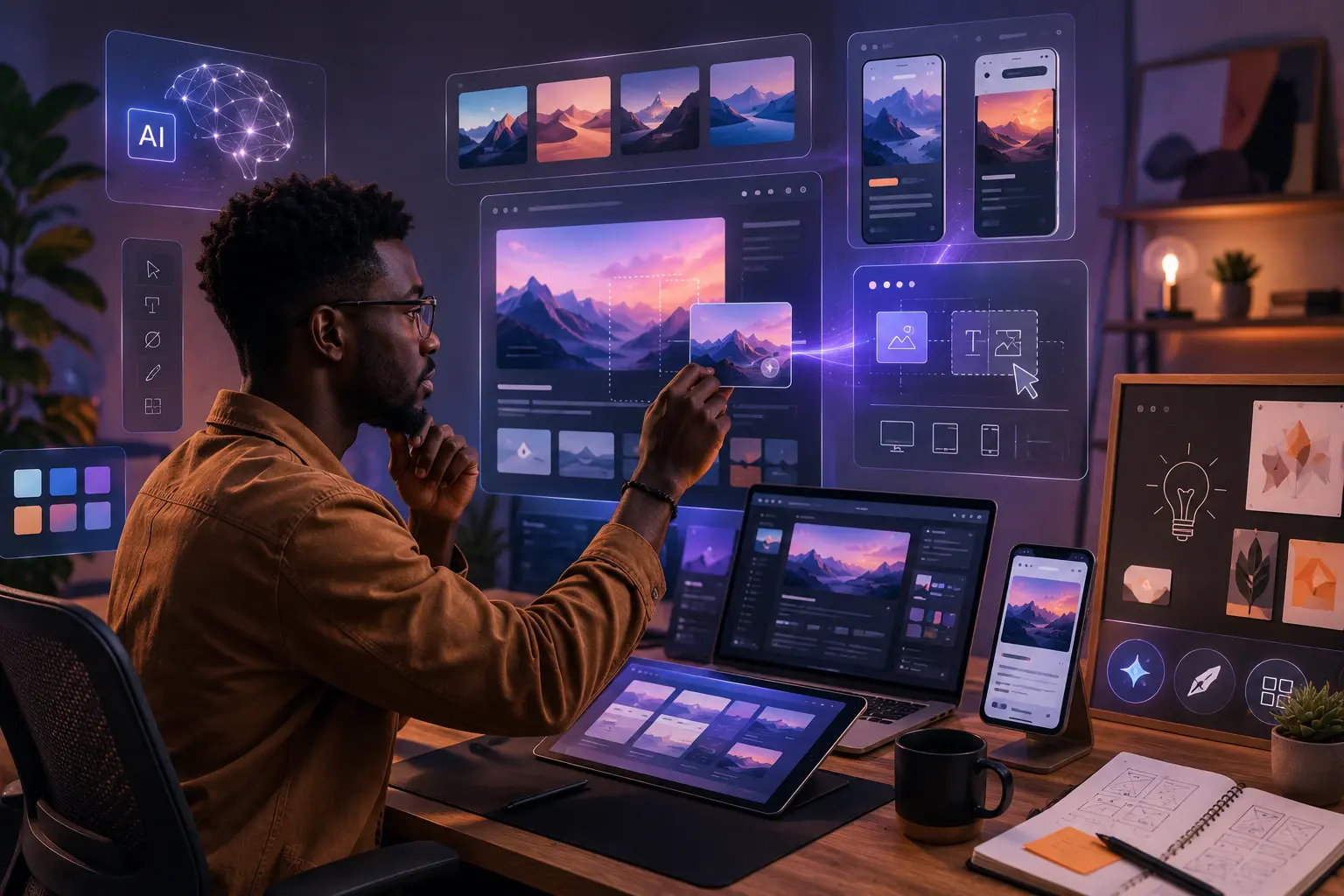
A founder recently mentioned that she built her company website in a weekend using an AI-powered builder. No developer or designer was needed, just prompts and drag-and-drop. She was proud of it, and honestly, she should be. The website worked as she expected.
For a long time, building websites required a mix of visual design skills and technical knowledge. Designers thought about layout, typography, color systems, and user interface aesthetics. Developers translated those ideas into functional web pages using HTML, CSS, and JavaScript. But today, the landscape is changing rapidly. AI-powered website builders and no-code platforms are making it easier than ever for anyone to launch a website without writing a single line of code.
So where does that leave the web page designer? If a non-technical person can ship a decent-looking site in 48 hours, it's fair to ask what a professional actually brings to the table. The question this raises for anyone working on the web is a real one: what does it actually mean to be a web page designer today, and which skills still matter?
In this article, we will look at how AI and no-code tools have changed how designing and building websites work, what has genuinely shifted about the role, and what skills remain valuable regardless of how the tooling evolves.
What We Used to Mean by "Web Page Designer"
First, a necessary distinction: a designer is not a developer. A UI/UX designer usually works with Figma or similar tools and is focused heavily on visual layout, placing images, arranging text, selecting colors, and designing page sections. A front-end developer writes code, thinks in components, performance, and accessibility, and works with code editors.
In some cases, one person could handle both roles. This required enough design sensibility to make layout decisions and enough technical skill to implement them.
That hybrid role has existed for years. But modern tools are shifting how much technical effort is required to turn an idea into a working site.
How No-Code Tools Have Changed the Landscape
No-code tools have existed for years, but the current generation has done something significant: they separate the act of building a website from understanding how websites are built. Platforms like Webflow and Framer allow users to visually construct websites while automatically generating HTML and CSS behind the scenes. Framer, in particular, has become a serious tool for interactive, animation-heavy marketing sites that would have previously required a skilled front-end developer.
What this has done is lower the barrier to entry for shipping websites. These Drag-and-drop builders let entrepreneurs, marketers, and small business owners launch sites without writing a line of code. A designer who previously had to hand off to a developer can now take a project from concept to production without writing a single line of code. For certain categories of work — landing pages, portfolio sites, marketing sites — this workflow is genuinely faster and the output is genuinely good.
But no-code tools have a ceiling. They work well within their constraints, and those constraints become visible quickly when a project needs custom functionality, complex data relationships, or performance optimizations that the platform does not support. Understanding where that ceiling is and when you are approaching it, is itself a skill that requires technical knowledge.
How AI Is Changing Design Workflows
Artificial intelligence has introduced another major shift in how web design work gets done. AI has added another layer to this. Tools like Figma's AI features, Galileo AI, can generate wireframes and UI layouts from a text description. GitHub Copilot, Claude and similar tools can produce functional React components from a prompt. Midjourney and similar image generation tools have changed how designers source and create visual assets.
These capabilities are changing workflows in several ways. For one, designers can explore ideas much faster. Instead of manually experimenting with dozens of layout variations, AI tools can generate multiple concepts instantly. This speeds up the early stages of design exploration.
AI is also helping automate repetitive tasks. For example, AI tools can assist with: generating placeholder content, suggesting color combinations, resizing assets for different screen sizes. This automation allows designers to focus on higher-level decisions rather than spending time on repetitive production work.
Where No-code Tools and AI Still Fall Short
Despite their power, AI and no-code platforms still have limitations.
1. Performance and Code Quality
No-code builders often generate bloated markup and unnecessary layers in the DOM. For a simple landing page this may not matter much. For larger platforms or performance-sensitive websites, it absolutely does.
A skilled developer understands how to optimize performance, reduce payload size, and make deliberate trade-offs.
2. Accessibility (A Critical Gap)
Accessibility is one of the most overlooked gaps in AI-generated interfaces. AI-generated interfaces frequently fail basic accessibility standards.
Common issues include:
- poor color contrast ratios that fail WCAG thresholds,
- missing or incorrectly labeled ARIA attributes,
- non-semantic markup that breaks screen reader navigation,
- missing skip links and keyboard focus management,
- images without meaningful alt text.
A landing page might look fine to a sighted user but be completely unusable for someone relying on a screen reader. A professional designer doesn’t just make something look good. They ensure it works for everyone. This is one of the clearest examples where human judgment prevents real-world harm.
3. Generic Design Output
AI-generated layouts tend to be generic. Because they are trained on patterns that work broadly, they produce outputs that can look familiar to the point of being indistinguishable from each other.
Creating a distinct brand experience that genuinely stands out requires intentional design thinking that goes beyond a simple prompt. The AI can generate a layout, but it cannot understand what makes a company meaningfully different from its competitors.
4. Real-World Complexity
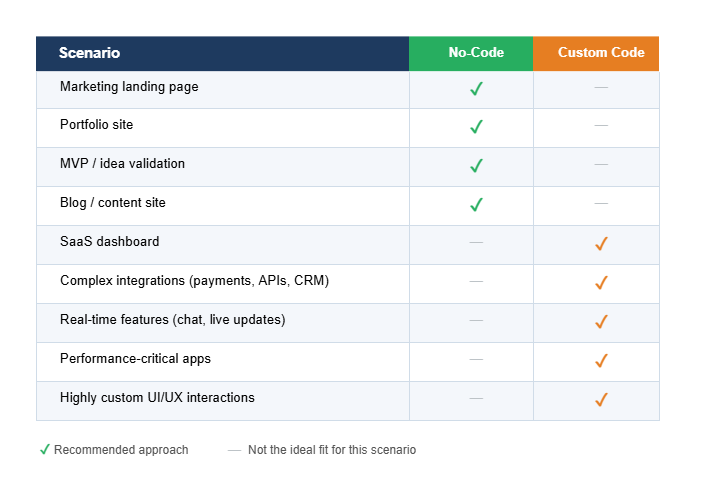
Most real-world products aren’t standalone websites. They connect to payment processors, CRMs, analytics platforms, authentication systems, internal APIs, and more. While no-code tools provide integrations for some of these systems, complex requirements quickly exceed their capabilities and require custom engineering.
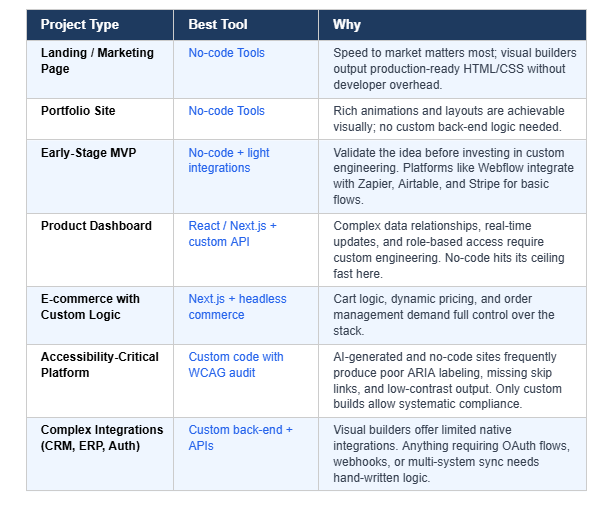
For example, a startup building a marketing landing page may use tools like Webflow or Framer to launch quickly. But the moment that same company needs a product dashboard, user authentication, or complex integrations, the limitations of those platforms become clear.
No-Code vs. Custom Code
When to use each approach for your next project
Who Is the Web Page Designer Now?
Here's the honest answer: the web page designer today is someone who knows how to use these tools effectively, and also knows exactly when to set them aside.
The role has shifted from execution to decision-making. The value is no longer primarily in the ability to manually build everything from scratch. Instead, it lies in the judgment required to decide what should be built, how it should be built, and which trade-offs are acceptable. That's a harder skill to automate than markup.
A modern web page designer brings four things that tools cannot replicate:
- Strategic clarity — the ability to look at a product requirement and map it to the right solution, whether that is a no-code tool, a component library, or a custom build from scratch.
- Technical depth — enough understanding of the web platform to make informed decisions about performance, accessibility, and maintainability when the stakes demand it.
- Communication — the ability to explain technical trade-offs to non-technical stakeholders: why a particular animation is worth the build time, or why a visual builder will create technical debt that compounds over six months.
- Systems thinking — the capacity to see how individual design decisions interact across a product, not just how a single screen looks in isolation.
Design systems are perhaps the clearest test of all four. AI tools integrated with Figma and component libraries can flag inconsistencies, auto-apply design tokens, and surface components that match existing patterns, and this is genuinely useful for maintaining coherence at scale. But enforcing a design system is not the same as building one.
Creating a design system with intent requires understanding the product, the users, the edge cases, and the organizational realities that will shape how every component gets used in practice. None of that exists in a prompt. It requires judgment, and judgment is precisely what the four qualities above describe.
Designers and developers who define their value purely by executing specific technical tasks may struggle as tools evolve. But professionals who focus on judgment, systems thinking, and user experience will continue to be essential.
Mapping Requirements to the Right Solution
This is where the role truly shifts—from execution to strategy. The modern designer creates value by choosing the right path, not just executing it.
Conclusion
The founder who built her site in a weekend made the right call for her context. But when that company grows, adds a dashboard, or needs to be accessible to thousands of users, she will likely need someone who understands the ceiling and how to push past it.
The rise of AI and no-code tools hasn't made the web page designer irrelevant. Designers today spend less time manually producing layouts and more time shaping the overall user experience of digital products. They think about structure, interaction, usability, and strategy.
AI tools and no-code platforms are best understood as accelerators rather than replacements. They help designers explore ideas faster and automate repetitive work, but they still rely on human judgment to create meaningful experiences.
If you are a developer or designer feeling uncertain about where you stand in this shifting landscape, the answer isn't to resist the tools or pretend the disruption isn't real. It's to get sharper at the thing these tools cannot replicate: understanding context, making intentional decisions, and building things that genuinely work for the people who use them.
In the end, the role of the web page designer is evolving—not disappearing. And in a world where anyone can generate a website in minutes, the designers who truly understand users, products, and systems will continue to stand out.
Frequently Asked Questions (FAQs)
1. What skills matter most for web designers today?
Key skills include UX thinking, design systems, product strategy, accessibility, performance awareness, and the ability to choose the right tools for each project.
2. Should new designers still learn HTML and CSS?
Yes. Even when using visual tools, understanding how the web works helps designers create better layouts, troubleshoot issues, and collaborate with developers.
3. When should you use no-code tools?
No-code platforms are ideal for landing pages, marketing websites, portfolios, and early-stage product validation, where speed is more important than customization.
4. What is the biggest advantage of AI in web design?
AI dramatically speeds up idea exploration, layout generation, and repetitive design tasks, allowing designers to focus on higher-level strategic decisions.
5. What separates a great web designer from one who will be replaced by these tools?
The key differentiator is judgment. Designers who define their value purely by the ability to execute technical tasks face the most risk. Those who can assess a project's requirements, choose the right tools and approach, and ensure the final product performs well for real users would always be relevant in the industry.