
Bukunmi Odugbesan
A frontend engineer with a desire to be a JavaScript expert
Article by Gigson Expert
Core Web Vitals are a set of metrics developed by Google to measure a user’s experience. Good core web vitals scores factor into Google’s search engine rankings and indicate a higher-quality user experience. Each of these metrics has a certain threshold that determines whether your page experience is Good, Needs Improvement, or Poor. There are 3 core web vitals metrics:
- Largest Contentful Paint (Loading Performances) - This is the time it takes to render the largest visible element (hero image, video poster, or big block of text) in the viewport. To provide a good user experience, try to have LCP occur within the first 2.5s of the page loading.
- Interaction to Next Paint (Responsiveness) - It observes every interaction (clicks, taps, key presses) during a user’s visit and reports the latency of the slowest one. It measures the time difference between when a user clicks a button and the next frame actually painting on the screen. To provide a good user experience, strive to have an INP of less than 200 milliseconds
- Cumulative Layout Shift (Visual Stability) - It measures how much elements move about unexpectedly. To provide a good user experience, try to have a CLS score of less than 0.1.
How To Measure Core Web Vitals
1. Google Search Console:
GSC gathers data from the Chrome User Experience Report, which reflects how users interact with a site. To check the core web vitals of a site, connect the site to Search Console, and find the core web vitals report by navigating to Experience - Core Web Vitals on the left sidebar.
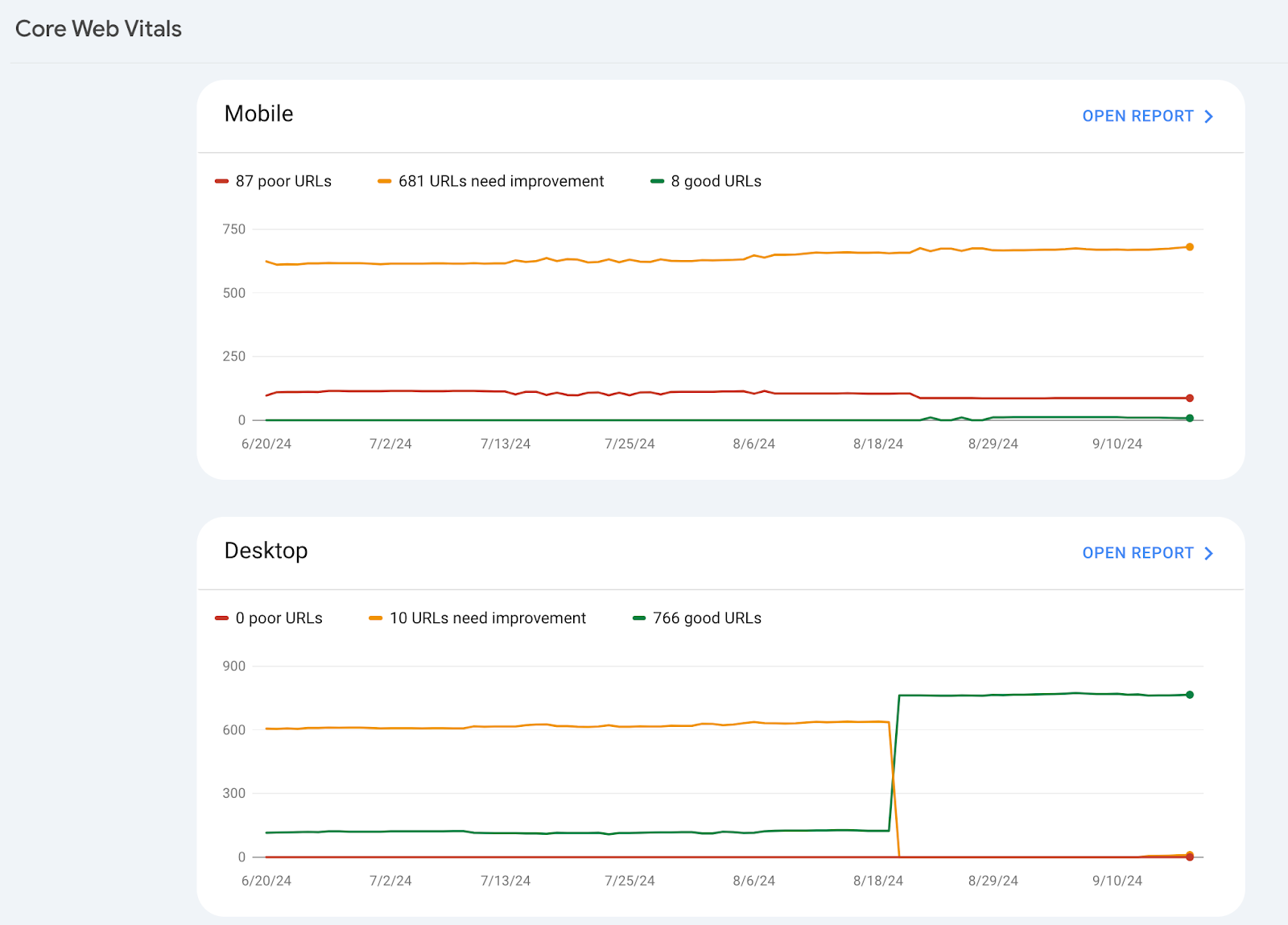
Search Console allows you to check the performance of your web pages altogether. When Open Report is clicked, this is what you see:
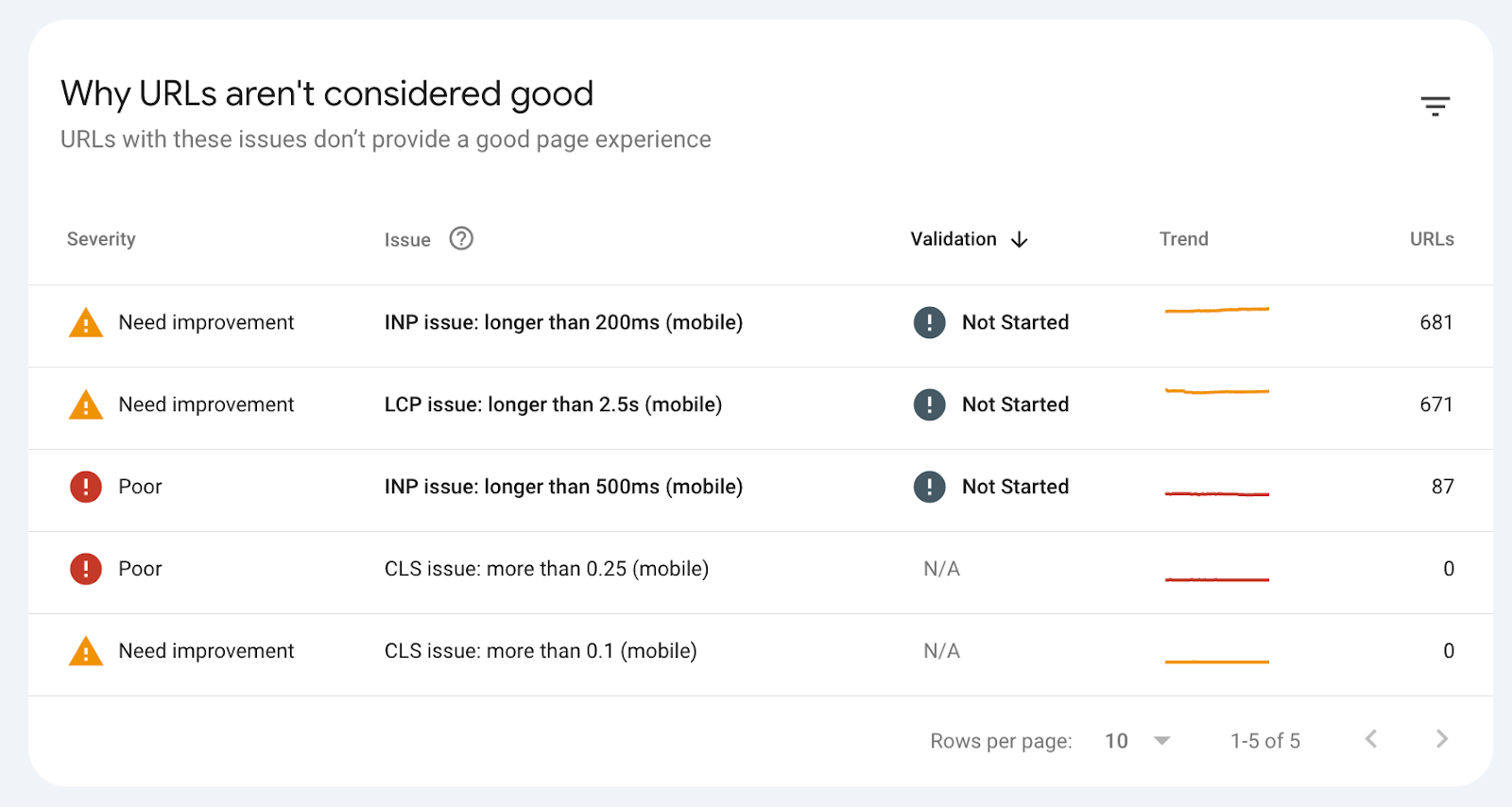
Rather than checking every page of your website individually, GSC groups several web pages with shared issues, so that changes can be implemented site-wide.
2. PageSpeed Insights:
To analyse specific web pages, consider PageSpeed Insights.
Type in the URL you want to check and click analyze. Score bars for several score metrics will be displayed, and information on whether your site passes or fails Core Web Vitals assessments. You can change between the Mobile and Desktop tabs to see the analysis from each device.
How To Improve Core Web Vitals
1. Optimizing LCP:
Low LCP scores are caused by slow server response times, resource load delay, or client-side rendering bloat. To improve LCP scores, preload the largest content on the webpage. Add this code snippet to the HTML header:
<link rel="preload" href="image/path/placeholder.jpg" as="image">Replace image/path/placeholder.jpg with the actual image URL for the hero image.
Aside from the largest content, other images on the website also need to be optimised to boost its performance. Use image compression tools to compress them before uploading to the website. Also, deploying using cloud hosting can effectively improve the LCP score. This is because they provide data via content delivery networks (CDN), which ensures the data comes from the closest content delivery network, causing it to travel a shorter distance in order for users to consume it faster.
2. Optimizing INP:
A very heavy JavaScript script such as a heavy 3rd party app, or a long-running event handler, is very often the cause of unresponsiveness. If the browser is busy parsing a huge script, there will be insufficient time to process user interactions. The most logical solution is to minify JavaScript using tools like UglifyJS.
Minification means removing unnecessary elements from scripts, such as white spaces, using simpler formats, and shortening function names. Apart from minification, it is also a good practice to defer the loading of JavaScript. This technique prevents JavaScript files from loading till other parts of the page are ready.
3. Optimising CLS:
Unexpected layout shifts are caused by images without dimensions, ads injecting themselves dynamically, or fonts loading late.
The easiest way to fix the image without dimension issues is to set a fixed dimension for all visuals. Since the web browser knows the height and width of the image, it can reserve the appropriate space on the page. As an example, you can add size attributes to your image like this:
<img src="image-name.jpg" width="1140" height="1140" alt="Image description">Use placeholders for dynamic content like ads so the layout doesn’t jump when the ad loads. Use font-display: optional to prevent font issues.
Other Website Performance Metrics
Besides the three primary metrics of Core Web Vitals, website owners also need to consider other web vitals to deliver a great user experience.
1. First Contentful Paint:
This is the time gap between the user first arriving on the webpage and the first content being displayed. To provide a good user experience, the aim is to have an FCP score of 1.8s or less.
2. Time To Interactive:
This is the time it takes a page to become fully interactive (users can click a button or hover over an image). A good TTI score is less than 5s.
3. Total Blocking Time:
This is the period when the page is blocked from responding to user input. A TBT score of 200 milliseconds indicates a page’s high responsiveness.
4. Time To First Byte:
It specifies how fast your web server responds to a request and sends user data to the browser. A TTFB score of 0.8s or less is considered good.
Conclusion
Core Web Vitals set the benchmark for your page’s user-friendliness. The better your site’s user experience, the more likely visitors will stay and engage with your content. Also, Google includes Core Web Vitals in its ranking system. Improving CWVs should be your top priority if you want your website to rank highly.
Frequently Asked Questions
Do single-page applications like React or Vue hurt Core Web Vitals?
Yes. SPAs often render a blank screen while JavaScript bundle downloads and executes, hurting your LCP score. Modern frameworks (NextJS) use server-side rendering to send pre-rendered HTML to the browser immediately, solving the LCP issue.
Will fixing my Core Web Vitals instantly improve my Google Ranking?
Not instantly, and not alone. Google uses a 28-day rolling average for CruX data. If the code is fixed today, it will take a month for it to reflect on Google Systems. Also, CWV is a tiebreaker. If two pages have equally great content, the faster one will rank higher.
How do ads and Pop-ups affect Core Web Vitals?
They are notorious score killers. Third-party ad scripts often run heavy JavaScript on the main thread, causing site freezes when a user tries to click a menu while the ad script is parsing.