.jpeg)
Modurotolu Olokode
Modurotolu Olokode is a seasoned full-stack engineer with a decade of experience in building scalable applications. Modurotolu is passionate about solving problems with technology and loves sharing insights that empower developers to make informed technical decisions.
Article by Gigson Expert
End-to-end (E2E) testing ensures your application works correctly from the user's perspective, catching integration issues (that unit tests may miss). However, choosing the right E2E testing framework significantly impacts test reliability, development speed, and maintenance burden. The three dominant players, Playwright, Cypress, and Selenium, each take different approaches to browser automation, with distinct strengths and limitations.
Understanding E2E Testing Fundamentals
E2E tests simulate real user interactions: clicking buttons, filling forms, navigating pages, and verifying results. Unlike unit tests that isolate individual functions, E2E tests validate entire user workflows across frontend, backend, and database layers. This comprehensive validation catches issues like broken authentication flows, payment processing errors, or data synchronization problems.
E2E tests are inherently more complex and slower than unit tests. They require running actual browsers, managing test data, and handling network latency. Tool choice directly affects test stability, execution speed, and how easily developers can debug failures.
Selenium: The Industry Veteran
Selenium has dominated browser automation since 2004, becoming the de facto standard for E2E testing. It uses the WebDriver protocol to control browsers through their native automation interfaces, supporting Chrome, Firefox, Safari, and Edge across Windows, macOS, and Linux.
# Selenium example - Python with explicit waits
from selenium import webdriver
from selenium.webdriver.common.by import By
from selenium.webdriver.support.ui import WebDriverWait
from selenium.webdriver.support import expected_conditions as EC

driver = webdriver.Chrome()
driver.get("https://example.com/login")

# Explicit wait for element to be clickable
wait = WebDriverWait(driver, 10)
username_field = wait.until(
    EC.presence_of_element_located((By.ID, "username"))
)
username_field.send_keys("testuser@example.com")

password_field = driver.find_element(By.ID, "password")
password_field.send_keys("password123")

submit_button = wait.until(
    EC.element_to_be_clickable((By.CSS_SELECTOR, "button[type='submit']"))
)
submit_button.click()

# Verify successful login
dashboard = wait.until(
    EC.presence_of_element_located((By.CLASS_NAME, "dashboard"))
)
assert dashboard.is_displayed()

driver.quit()
Selenium code example with explicit waits in Python
Why this code matters
Selenium requires explicit waits and careful timing management. Tests become flaky if waits are missing or poorly tuned, increasing maintenance overhead as applications grow more dynamic.
Selenium’s strength lies in its maturity: broad language support, enterprise adoption, and extensive third-party integrations. Its downside is that many modern E2E testing challenges must be solved manually.
Cypress: The Developer Experience Pioneer
Cypress emerged in 2017 with a radically improved developer experience. By running tests inside the browser, Cypress enables automatic waiting, intuitive APIs, and unmatched debugging capabilities.
// Cypress example - automatic waiting and retries
describe('User Login Flow', () => {
  it('successfully logs in and redirects to dashboard', () => {
    cy.visit('https://example.com/login')

    // Automatic waiting - no explicit waits needed
    cy.get('#username').type('testuser@example.com')
    cy.get('#password').type('password123')
    cy.get('button[type="submit"]').click()

    // Automatic retry until element exists and assertion passes
    cy.get('.dashboard').should('be.visible')
    cy.url().should('include', '/dashboard')

    // Built-in network stubbing
    cy.intercept('GET', '/api/user/profile', {
      statusCode: 200,
      body: { name: 'Test User', email: 'testuser@example.com' }
    })
  })
})
Cypress example with automatic waits and retries
Why this code matters
Cypress eliminates explicit waits entirely. Assertions automatically retry until they pass or time out, making tests more readable and significantly reducing flakiness.
Cypress is especially strong for modern JavaScript applications (React, Vue, Angular). However, its in-browser architecture limits multi-tab workflows, deep iframe interaction, and full Safari coverage.
Playwright: The Modern Powerhouse
Released by Microsoft in 2020, Playwright combines Cypress-style developer ergonomics with Selenium-level browser control.
// Playwright example - multiple browsers, automatic waiting
const { test, expect } = require('@playwright/test');

test('user login flow', async ({ page }) => {
  await page.goto('https://example.com/login');

  // Automatic waiting built into all actions
  await page.fill('#username', 'testuser@example.com');
  await page.fill('#password', 'password123');
  await page.click('button[type="submit"]');

  // Assertions automatically retry until timeout
  await expect(page.locator('.dashboard')).toBeVisible();
  await expect(page).toHaveURL(/.*dashboard/);

  // Network interception
  await page.route('/api/user/profile', route => {
    route.fulfill({
      status: 200,
      body: JSON.stringify({ name: 'Test User' })
    });
  });
});

// Run same test across browsers
test.describe('cross-browser testing', () => {
  test.use({ browserName: 'chromium' });
  test.use({ browserName: 'firefox' });
  test.use({ browserName: 'webkit' });

  test('works everywhere', async ({ page }) => {
    // Same test runs on Chrome, Firefox, and Safari
  });
});
Playwright with automatic waiting built in
Why this code matters
Playwright provides automatic waiting like Cypress but supports multiple browsers and languages (JavaScript, Python, Java, .NET). This flexibility makes it suitable for diverse team environments.
Playwright supports true multi-browser testing, including parallel execution across Chrome, Firefox, and Safari. Its auto-waiting mechanism eliminates flaky tests caused by timing issues. The framework includes a built-in test runner, assertions, screenshots, video recording, and tracing capabilities. Language support spans JavaScript, TypeScript, Python, Java, and .NET, making it accessible to diverse teams.
Recent additions such as component testing, API testing capabilities, and visual regression testing make Playwright increasingly comprehensive. However, as a newer tool (versus Selenium's 20-year history), community resources and third-party integrations are still growing
Architecture Comparison: Why It Matters
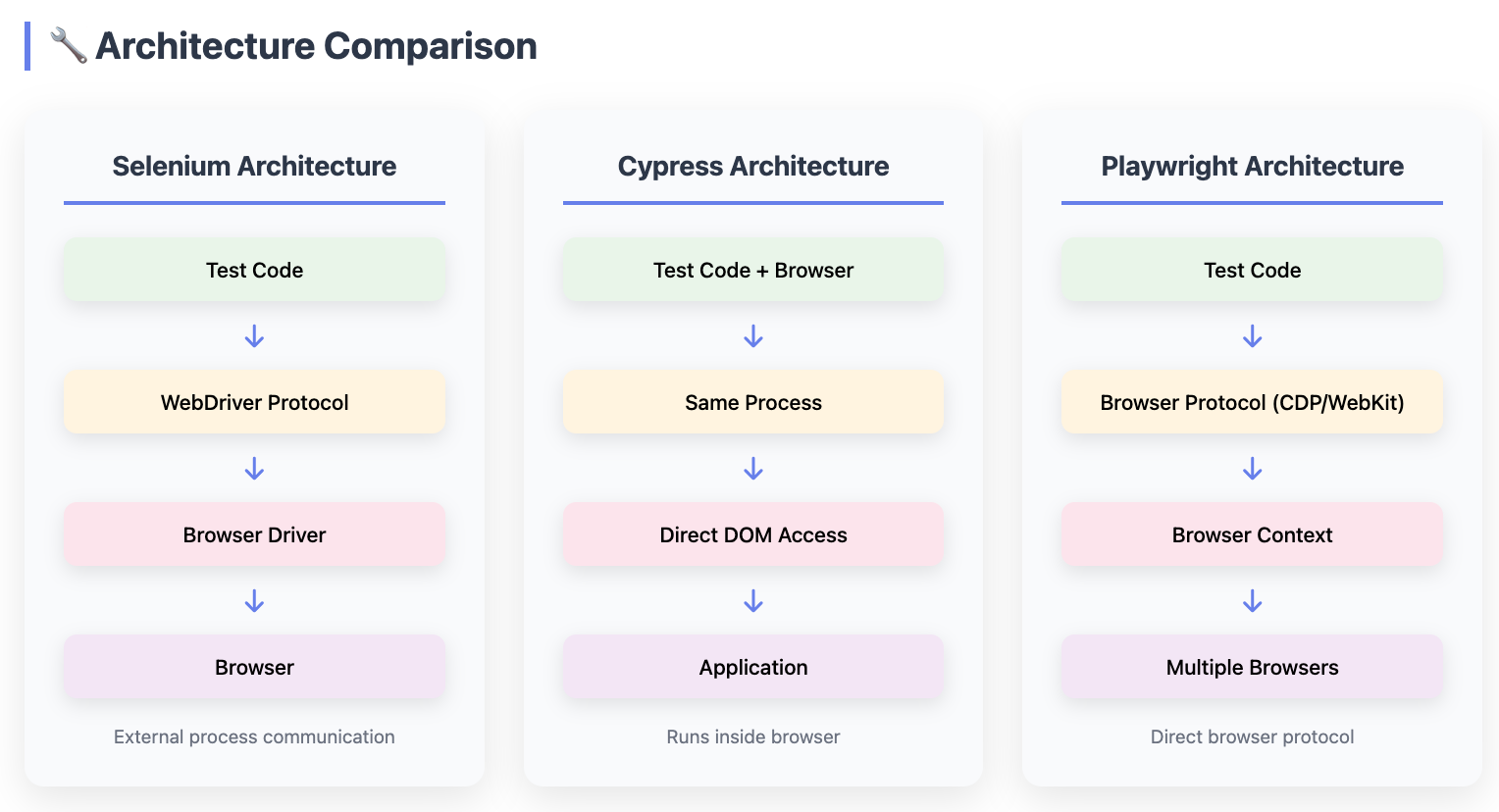
The architectural differences between Selenium, Cypress, and Playwright explain many of their strengths and limitations, especially around reliability, browser coverage, and debugging.
Cypress: Running Inside the Browser
Cypress runs inside the browser, executing test code in the same JavaScript runtime as the application under test. This design enables:
- Direct access to the DOM and application state
- Automatic waiting and retry logic
- Time-travel debugging with DOM snapshots
However, this architecture also creates fundamental constraints:
- No true multi-tab or multi-window support
- Limited control over cross-origin iframes
- Historically restricted cross-origin navigation (improving, but still constrained)
These are not missing features; they are architectural trade-offs. Because Cypress shares the browser process with the app, it sacrifices certain browser-level capabilities in exchange for a superior developer experience.
Selenium & Playwright: Out-of-Process Browser Control
Selenium and Playwright run outside the browser, controlling it via automation protocols:
- Selenium → WebDriver (W3C standard)
- Playwright → Native browser automation protocols (Chromium, Firefox, WebKit)
This separation allows:
- True multi-tab and multi-window workflows
- Full iframe and cross-origin support
- Independent browser lifecycle control
Playwright benefits from this model without inheriting Selenium’s flakiness, thanks to automatic waiting built into every action. In short:
Cypress optimizes for developer ergonomics inside the browser, while Playwright optimizes for control over the browser itself
Safari vs. WebKit: A Crucial Distinction
Safari support often determines E2E tool choice for consumer-facing products.
- Cypress: Safari support is experimental and does not fully match real Safari behavior.
- Playwright: Tests run against the actual WebKit engine, the same engine used by Safari.
Why this matters
Playwright does not emulate Safari; it runs Safari’s engine directly. For B2C companies with high iOS traffic, this provides the most accurate Safari testing available outside of real-device cloud services.
For teams already evaluating Playwright-based workflows, it may also be useful to compare how Shiplight approaches E2E testing differently from Playwright alone. This Shiplight vs Playwright comparison explains how coding agents can use a real browser to verify UI changes and turn those checks into maintained E2E tests.
Performance and Reliability Comparison
Speed differences impact both developer productivity and CI/CD pipeline efficiency. Running a typical 100-test suite reveals significant variations:
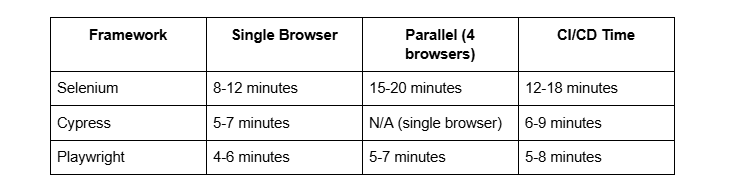
Why these numbers matter
Faster tests mean quicker feedback loops. Playwright's parallel execution across browsers without significantly increased time makes comprehensive testing practical.
Flakiness, tests that randomly fail without code changes, plagues E2E testing. Modern frameworks address this through automatic waiting and retry logic:
- Selenium: Requires manual explicit waits, leading to flaky tests when improperly implemented
- Cypress: Automatic retry on assertions significantly reduces flakiness
- Playwright: Automatic waiting on all actions, plus configurable retry logic, provides the most stable tests
While features and architecture matter, understanding real-world adoption is just as important. If you’re wondering how these tools are actually being used, the table below provides clear insight into what others are choosing.
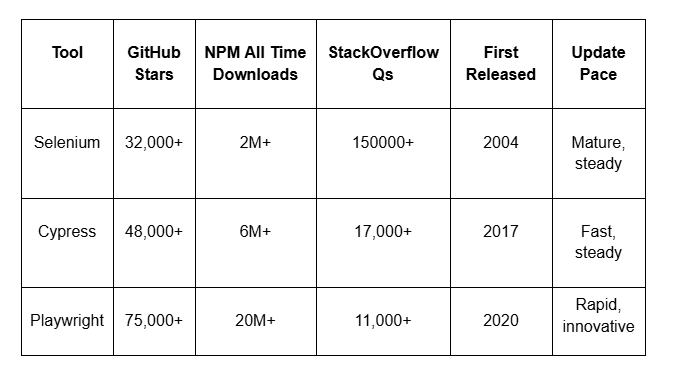
Developer Experience Breakdown
Setup complexity varies dramatically:
Selenium:
# Requires browser driver management
pip install selenium
# Download ChromeDriver, ensure version matches Chrome
# Set PATH or use webdriver-manager
# Configure for each browser separately
Cypress:
# Simple npm install includes everything
npm install cypress --save-dev
npx cypress open
# Browsers auto-detected, no driver management
Playwright:
# Install includes browser binaries
npm init playwright@latest
# Automatically installs Chrome, Firefox, WebKit
npx playwright test
Why this matters
Lower setup friction means teams spend less time on tooling and more time writing tests. Cypress and Playwright eliminate the driver management headaches that plague Selenium projects.
Debugging capabilities directly impact how quickly developers can fix failing tests:
- Cypress provides time-travel debugging through its Test Runner, which shows DOM snapshots at each command.
- Playwright offers a trace viewer with screenshots, network logs, and an execution timeline.
- Selenium requires external tools and manual screenshot capture for debugging context.
Language and Ecosystem Support
Language availability affects team adoption:
Selenium:
- Python, Java, C#, JavaScript, Ruby, PHP
- Largest ecosystem with frameworks like TestNG, JUnit, NUnit
- Most third-party integrations and cloud testing platforms
Cypress:
- JavaScript/TypeScript only
- Growing plugin ecosystem
- Strong integration with modern JS tooling
Playwright:
- JavaScript, TypeScript, Python, Java, .NET
- Rapidly expanding ecosystem
- Modern API design across all languages
For teams heavily invested in Java or Python, Selenium and Playwright offer native language support. JavaScript-only teams find Cypress's focused approach beneficial. Mixed-language organizations often prefer Playwright's comprehensive language coverage.
Common Testing Scenarios
Scenario 1: E-commerce Checkout Flow
- Problem: Testing multi-step checkout with payment processing
- Selenium: Complex wait management, difficult network mocking
- Cypress: Excellent network stubbing, but payment gateway testing is limited by iframe restrictions
- Playwright: Full iframe support, reliable network interception, works well for complete flows
Scenario 2: Mobile Web Testing
- Problem: Validating responsive design and touch interactions
- Selenium: Requires Appium for mobile browsers, separate setup
- Cypress: Limited mobile browser support, emulation only
- Playwright: Built-in mobile emulation, touch events, geolocation, works across mobile browsers
Scenario 3: Cross-Browser Compatibility
- Problem: Ensuring the app works on Chrome, Firefox, and Safari
- Selenium: Full support, but slow parallel execution
- Cypress: Limited to Chrome-family and Firefox. Safari experimental
- Playwright: Native support for all three, fast parallel execution
Migration Considerations
Teams rarely start with greenfield testing infrastructure. Migration from Selenium to modern alternatives requires careful planning:
Gradual Migration Strategy:
- Start with new features/pages in the target framework
- Migrate the highest-value or most-flaky tests first
- Run both frameworks in parallel during transition
- Sunset Selenium tests once coverage is achieved
Expected Timeline:
- Small project (50-100 tests): 1-2 months
- Medium project (500+ tests): 3-6 months
- Large project (1000+ tests): 6-12 months
Key Takeaway
Don't attempt wholesale migration. Incremental adoption reduces risk and allows teams to learn the new framework while maintaining test coverage.
Conclusion
The E2E testing landscape has evolved significantly beyond Selenium's WebDriver model. Cypress revolutionized developer experience for JavaScript teams, while Playwright combines cross-browser capabilities with modern architecture. However, Selenium remains relevant for teams with established Java/C# ecosystems or specific browser coverage requirements.
For new projects, Playwright offers the strongest combination of features, performance, and flexibility. JavaScript-focused teams appreciate Cypress's refined developer experience. Selenium suits organizations with significant existing investment or specific enterprise requirements.
The right choice depends on your team's language preferences, browser support needs, and existing infrastructure. Evaluate based on actual project requirements rather than framework popularity, and consider that many successful teams use multiple tools for different testing needs
Frequently Asked Questions
Q: Can I use multiple testing frameworks in the same project?
A: Yes, many teams run Cypress for rapid feedback during development and Playwright for comprehensive cross-browser CI/CD testing. This "testing pyramid" approach balances speed and coverage. Keep test code separated to avoid dependency conflicts.
Q: How do these tools handle authentication and session management?
A: All three support authentication, but approaches differ. Cypress excels with cy.session() for caching auth state. Playwright offers storage state persistence across tests. Selenium requires manual cookie/token management. Modern frameworks make authentication testing significantly easier.
Q: Which framework is best for CI/CD integration?
A: All integrate well with CI/CD platforms. Playwright has the fastest execution time and cleanest parallel execution. Cypress provides excellent debugging artifacts. Selenium has the most mature cloud testing platform integrations (BrowserStack, Sauce Labs).
Q: Can these tools test mobile applications?
A: For mobile web, Playwright offers the best mobile browser emulation. Cypress provides basic mobile viewport testing. Native mobile apps require Appium (a Selenium-based tool) or specialized tools like Detox. None of these three directly tests iOS/Android native apps.
Q: How do I handle dynamic content and SPAs?
A: Modern frameworks (Cypress, Playwright) handle SPAs excellently through automatic waiting. Selenium requires explicit waits and careful timing. All three can test dynamic content, but Playwright and Cypress make it significantly easier through built-in retry logic.